Changing the default SSH port is one of those pieces of sysadmins advice that keeps getting repeated because it sounds sensible. Port 22 is well known, automated scanners constantly probe it, and moving SSH to something like 2222 makes the server appear a little less obvious.
It also gives you a new port number to remember. That trade-off would be worth discussing if changing the port provided meaningful protection. In most ordinary server setups, it does not. It mostly reduces some automated noise while adding a small amount of friction to your own workflow.
Suppose you move SSH from 22 to 2222. Your connection changes from:
ssh user@server
to:
ssh -p 2222 user@server
You can, of course, put the port in ~/.ssh/config:
Host foo.bar
    HostName foo.bar
    User user
    IdentityFile ~/.ssh/lorenba
    Port 2222
Now everything works exactly as before, but notice what happened? You changed a perfectly standard configuration, updated your client configuration to compensate for the change, and the bots still have a way to discover the SSH service.
The only obvious benefit is that some scanners looking specifically for port 22 will move on. Is that really worth optimizing?
The illusion of invisibility
Security through obscurity is a bit like hiding your house key under the doormat. It feels clever for about five seconds, right up until you realize that checking under the doormat is the very first thing a burglar will do. Modern port scanners do not just knock on port 22 and call it a day. A tool like Nmap can sweep all 65,535 ports on a machine in the time it takes you to take a sip of coffee. Once the scanner finds an open port, it probes the service. When your server enthusiastically responds with an SSH banner, the gig is up.
You have not hidden the service. You have only slightly delayed its inevitable discovery.
The privileged port problem
There is a more technical quirk to consider, one that often escapes casual observation. In Unix-like operating systems, ports below 1024 are considered “privileged ports.” Only the root user can bind to them. Port 22 falls safely inside this VIP section.
If you move your SSH daemon to a high port, say 2222 or 65000, you are stepping out of the privileged zone. Suppose a malicious actor manages to crash your SSH service, perhaps through an out-of-memory error or a kernel bug. If they have a non-root foothold on your system, they could potentially spin up their own rogue SSH daemon on that high port before your system restarts the legitimate one. Suddenly, you are authenticating against an attacker’s honeypot.
By keeping SSH on port 22, you guarantee that only a process with root privileges can handle your login requests. It is a subtle but foundational layer of trust.
What to do instead of moving the port
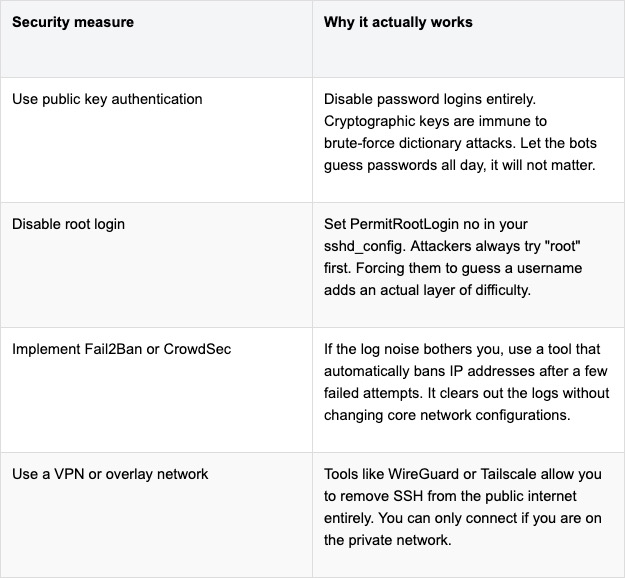
If changing the port is a theatrical distraction, how do we actually secure the server? The good news is that the alternatives are far more robust and require zero memorization of arbitrary numbers.
At the end of the day, port 22 is where SSH lives. Leaving it there is not a sign of laziness. It is a sign that you trust your actual security configurations rather than relying on a game of hide and seek.
I spent an evening reading the source of an AI agent that had been running on my own machine for three weeks, and I came away with two feelings that do not normally coexist. The first was relief, because the people at Nous Research clearly thought about this harder than I expected. The second was a mild, creeping unease, because the parts they could not protect are exactly the parts I had been ignoring.
Hermes Agent is an autonomous agent with persistent memory. It keeps state across sessions, works through long goals on its own schedule, writes its own reusable skills from experience, and talks to you from Telegram, Discord, or Slack while it does it. That last detail is the one that changes everything. A coding assistant sits politely in your IDE waiting to be asked. Hermes runs on a VPS you are not looking at, at three in the morning, and reports back later.
That is the feature. It is also the problem. So this is a guide to putting Hermes somewhere useful without handing it the keys to your production environment, written after actually reading what it already does for you, which turns out to be more than most blog posts on this subject assume.
Why an always-on agent is a different animal
The security model of a chatbot is simple because a chatbot has no initiative. It answers, it stops, it waits. Nothing happens between your messages.
An autonomous agent inverts that. Hermes monitors, decides, and acts without a human in the loop, which means three properties collapse together in a way that traditional threat modelling does not handle well.
It has initiative, so the trigger for an action may be a cron job or a Slack message from someone who is not you. It has memory, so a decision it makes today can influence a decision it makes next month, long after you have forgotten the context. And it has tools, so its output is not text; it is a shell command, an API call, a kubectl apply.
Combine those, and you get a category of failure that does not exist in ordinary software. An attacker does not need to compromise the agent’s process. They only need to get some text in front of it. A poisoned README in a repo it clones, a crafted issue on GitHub, a message in a channel it monitors. Prompt injection is not a memory safety bug you can patch. It is a consequence of the agent doing its job, which is reading things and acting on them.
What Hermes already gives you, which is not nothing
Here is the part that most security write-ups skip, and skipping it makes them both unfair and less useful. Hermes ships a documented defence-in-depth model with eight layers, and if you deploy it without knowing what they are, you will end up rebuilding controls that already exist while leaving the real gaps open.
The ones worth knowing before you write a single line of infrastructure:
Dangerous command approval. Before running a shell command, Hermes matches it against a list of destructive patterns (rm -r, mkfs, dd if=, DROP TABLE, curl … | sh, writes to /etc/ or ~/.ssh/). The default smart mode uses an auxiliary model to triage, trivially safe commands pass, clearly dangerous ones are denied, ambiguous ones escalate to you. Approval prompts fail closed after a timeout.
A hardline blocklist underneath all of it. A handful of unrecoverable commands (rm -rf /, fork bombs, zeroing a block device) are refused regardless of –yolo, regardless of “approvals.mode: off”, regardless of you clicking “allow always”. There is no override flag. This is a genuinely good design decision, and I wish more tools had it.
File write safety. write_file and patch are blocked from touching credential stores (~/.ssh/, ~/.aws/, ~/.kube/, .env files anywhere on disk) with no approval prompt and no way to override from chat.
SSRF protection on every URL-capable tool. Private ranges, loopback, link-local (including 169.254.169.254, the cloud metadata endpoint), and cloud metadata hostnames are blocked by default, with redirect chains revalidated at each hop.
Context file injection scanning. AGENTS.md, .cursorrules, and similar files are scanned for injection patterns, hidden HTML comments, and invisible Unicode before they reach the system prompt.
Gateway authorization that defaults to deny. If you configure no allowlists, nobody can talk to the bot.
Now, the important caveat, which the documentation itself states plainly. The write guards apply only to write_file and patch. The terminal tool runs as the same OS user and can cat or overwrite those same paths with a shell command. The approval system is a guardrail against an honest-but-mistaken agent. It is explicitly not a sandbox against a hostile one.
That distinction is the whole reason the rest of this article exists. Everything above stops the agent from making a mistake. Almost none of it stops an agent that has been successfully talked into something.
What “secure” should mean here
Before the configuration, the goals. An agent deployment is defensible when five things are true.
It has its own identity. The agent acts as itself, never as you. Every action is attributable to a principal that exists only for the agent and dies with it.
It runs least privilege by default-deny. It reaches exactly the systems its job requires, and the list of those systems is written down somewhere reviewable.
Its credentials are short-lived, narrow, and ideally invisible to it. The best secret is one the agent never holds.
Its runtime is contained. A compromised agent stays a compromised agent instead of becoming a compromised host.
Everything it does is reconstructable from immutable logs. Not from asking the agent what it remembers doing, which is roughly as reliable as asking a witness.
And a sixth one, specific to Hermes and to any agent with a learning loop, which I did not appreciate until I read the skills documentation: what the agent learns is code, and it must be treated as code. More on that in step seven, which is the step I would keep if I could only keep one.
Step 1: Contain the runtime
Never run the agent on the host, and never as root. Hermes makes this a one-line decision because the terminal backend is configurable, and switching it to Docker moves execution into a container that Hermes hardens itself:
Every container Hermes launches gets –cap-drop ALL (with DAC_OVERRIDE, CHOWN and FOWNER added back so package managers work), –security-opt no-new-privileges, a 256 process limit, and size-limited tmpfs mounts on /tmp and /var/tmp with noexec on the latter. That is a better default than most hand-rolled docker run lines I have reviewed in production, including some of mine.
Two things to know about this switch.
First, “container_persistent: false” is the setting people skip. In persistent mode, the sandbox filesystem survives across sessions, which means an attacker who lands something in /workspace on Monday still has it on Thursday. Ephemeral mode throws it away. Use ephemeral unless you have a concrete reason not to.
Second, and this one surprised me. When the backend is a container, Hermes skips the dangerous command checks entirely, on the reasoning that the container is now the boundary. That reasoning is correct, and it also means your blast radius is now exactly the container definition. If you bind-mount your home directory in, you have quietly deleted both layers at once.
If you want a real boundary instead of a shared kernel, run this inside a microVM. Firecracker or Cloud Hypervisor boots in tens of milliseconds and gives you a hardware isolation line, which is a proportionate response to a workload whose behaviour you cannot fully predict.
If you use the official Docker image, note the operational trap. The gateway runs as the unprivileged hermes user (uid 10000), but “docker exec” defaults to root, and files that root creates are unreadable to the gateway. Pairing approvals fail silently.
Data exfiltration is the worst outcome of a successful prompt injection, and it is the one where network controls beat application controls decisively. The agent can be talked into anything. The firewall cannot.
Start with the two settings Hermes already exposes:
# ~/.hermes/config.yaml

security:

  allow_private_urls: false     # default, keep it that way on any gateway

  website_blocklist:

    enabled: true

    domains:

      - "*.internal.company.com"

      - "admin.example.com"

  tirith_enabled: true

  tirith_fail_open: false       # block when the scanner is unavailable

  allow_lazy_installs: false    # no runtime pip installs
“tirith_fail_open: false” is the change worth arguing about. The default is true, meaning commands proceed if the content scanner is missing or times out. That is the right default for a laptop and the wrong one for a production gateway, where a scanner that is not running should stop the line rather than wave things through.
Then put a real allowlist under it, at the network layer, where the agent’s opinions do not matter. On Kubernetes:
apiVersion: networking.k8s.io/v1

kind: NetworkPolicy

metadata:

  name: hermes-agent-egress

  namespace: agents

spec:

  podSelector:

    matchLabels:

      app: hermes-agent

  policyTypes:

    - Egress

  egress:

    # DNS only to the cluster resolver

    - to:

        - namespaceSelector:

            matchLabels:

              kubernetes.io/metadata.name: kube-system

          podSelector:

            matchLabels:

              k8s-app: kube-dns

      ports:

        - protocol: UDP

          port: 53

    # everything else goes through the proxy, nowhere else

    - to:

        - podSelector:

            matchLabels:

              app: egress-proxy

      ports:

        - protocol: TCP

          port: 3128
Nothing else leaves. When the injection eventually happens, and it will, the exfiltration attempt dies at the network layer and lands in your proxy logs, which is the best possible outcome. An attack that failed and told you about itself.
Step 3: Give the agent its own identity
If the agent uses your kubeconfig, the agent is you. On a bad day, that means it holds cluster admin, and every command it hallucinates is permanently attributed to your name in the audit log. Explaining that in a post-incident review is a specific kind of misery.
Give it a ServiceAccount scoped to the handful of verbs it actually needs:
Read-only, namespaced, no wildcards. When the agent needs to restart a deployment, resist the urge to add patch on deployments and instead give it one narrow verb on one named resource, or better, a pipeline it can trigger that a human owns. Every verb you add here is a verb an attacker inherits.
Apply the same paranoia everywhere else it touches: a dedicated GitHub App with repository-scoped permissions instead of your PAT, a dedicated cloud service account instead of your admin role.
Step 4: Keep credentials short-lived, or absent
Long-lived static credentials are a bad idea in ordinary software. Handed to an agent that can be talked into printing them, they are a liability with an expiry date you do not control.
The first discipline is passthrough hygiene. Hermes strips sensitive variables from child processes by default: execute_code blocks anything whose name contains KEY, TOKEN, SECRET, PASSWORD, CREDENTIAL, or AUTH, and MCP subprocesses receive only PATH, HOME, USER, LANG, LC_ALL, TERM, SHELL, TMPDIR, and XDG_*. Everything else is stripped. Do not undo this. Every name you add to docker_forward_env or terminal.env_passthrough is a secret that code in the container can read and send anywhere.
The second is to stop giving it the secret at all. This is where I have to correct something I believed when I started writing: I assumed you would have to build the credential-injection proxy yourself as a sidecar. You do not. Hermes ships one.
hermes egress setup
The egress proxy (iron-proxy, a TLS-intercepting single binary managed by the Hermes egress commands) holds your real API keys on the host and gives the sandbox nothing but opaque tokens. The agent asks the proxy to make the call. The proxy injects the credential on the way out. The sandbox never sees a usable secret, so an injection that convinces the agent to exfiltrate its credentials exfiltrates a token that is worthless outside the proxy.
This is the single highest-value control in the entire article. It takes one command, and it is documented in a corner of the docs that almost nobody reads. If you take one thing from this piece, take this.
For cloud access, the same principle applies through Workload Identity or IRSA. The pod’s identity is federated at the API boundary, and there is no key material on disk to steal.
Step 5: Build an audit trail you can actually query
You need to answer who did what and when, from logs the agent cannot edit. Three sources, aggregated centrally:
The proxy access log, which is your ground truth for every outbound request, including the ones that were blocked.
The Kubernetes API server audit log, filtered to the agent’s identity so it is readable:
And Hermes’ own state, which lives in ~/.hermes/logs/ and ~/.hermes/state.db. That database is genuinely useful, because it records which dangerous commands were classified and which ones actually executed. There is even a command that mines it:
hermes approvals suggest --days 90
It prints the patterns you approved most often. Read it as a confession rather than a convenience: if you have approved git push –force fourteen times, you have not been reviewing those prompts. You have been dismissing them. Ship ~/.hermes/ to your SIEM on a schedule, and remember that these logs live inside the blast radius, so they corroborate the external ones rather than replacing them.
Step 6: Cap the blast radius of always-on
Always-on means the exposure window never closes, so put ceilings on everything that can run away.
# ~/.hermes/config.yaml

approvals:

  mode: manual          # no auxiliary-model triage in production

  timeout: 120

  cron_mode: deny       # headless jobs never auto-approve

  single_query_mode: deny

  deny:

    - "git push --force*"

    - "kubectl delete*"

    - "terraform apply*"

    - "*curl*|*sh*"
Note what approvals.deny is for. It sits below –yolo and “approvals.mode: off”, so it survives the moment six months from now when somebody adds –yolo to a script to unblock a deploy. Write the list for that person, because that person is you on a Friday.
Set a hard spending cap on the provider API key at the provider. And keep the gateway allowlist explicit. Never “GATEWAY_ALLOW_ALL_USERS=true”:
Step 7: Treat what the agent learns as untrusted code
This is the step that does not appear in generic agent hardening guides, because it is specific to agents that learn, and it is the one I would fight to keep.
Hermes’ defining feature is its learning loop. When it solves something, it writes a reusable skill as a Markdown file, stores the outcome in persistent memory, and adjusts next time. Agent-created skills land in ~/.hermes/skills/.
Sit with that for a second. The agent writes procedure documents that the agent later follows. Which means a prompt injection does not have to steal anything today. It can instead persuade the agent to write a skill, and that skill will be loaded and followed next week, next month, in a session that has nothing to do with the original attack, triggered by a cron job while you are asleep. Every control in steps one through six is scoped to a session. This one crosses sessions. It is persistence, in the red-team sense of the word, implemented as a feature.
Nous clearly thought about this. Skills installed from the Hub and skills carried by repositories are scanned for prompt injection directives, credential exfiltration commands, and hidden text tricks, and a skill that fails the scan is quarantined so it does not appear in the index and refuses to load by name. Repository skills require an explicit “hermes skills trust” before they load at all.
But a scanner is a filter, and filters have false negatives. For anything touching production, turn the gates on:
# ~/.hermes/config.yaml

skills:

  write_approval: true    # every skill create/edit/delete waits for you

memory:

  memory_enabled: true

  write_approval: true    # same gate on memory writes
With these on, writes are staged under ~/.hermes/pending/skills/ and you review them like a pull request:
Then go one step further and make the skills directory a git repository:
cd ~/.hermes/skills && git init && git add -A

git commit -m "baseline: approved skill set"
Now every change the agent proposes to its own behaviour produces a diff with a timestamp and an author, reviewed by a human, revertable with one command. This costs you a few minutes a week and converts the most alarming property of the agent into the most auditable one.
One more thing on state. If you use the SSH, Modal, or Daytona backends, Hermes pushes ~/.hermes/ into the remote sandbox and syncs changed files back to the host afterwards, including skills the agent created remotely. The sandbox boundary you carefully built is, for this specific directory, a two-way street. Plan accordingly.
What is still broken after all seven steps
Two things, and I would rather say them than pretend the checklist is complete.
The terminal tool remains a hole in the write guards. Hermes’ protected-path denylist stops write_file and patch from touching ~/.ssh/ or .env files, but the terminal tool runs as the same OS user and can cat them with a shell command. The documentation says so explicitly. The only real answer is the container or microVM boundary from step one, which is why step one is step one.
Your guardrails now live in five different places. Kubernetes RBAC, cloud IAM, a NetworkPolicy, a proxy allowlist, and a YAML file in a home directory. There is no single pane of glass showing what the agent can do, and no way to ask “can it reach the payments database?” without checking five systems and reasoning about their intersection. Until unified agent control planes exist, the answer is Terraform: put all five in one repository, in one module, reviewed together, so that at least the drift is visible.
Hermes Agent is a serious piece of engineering, and after a week of reading its source, I trust it more than I did going in, not less. It will automate the work you have been putting off, run deployments while you sleep, and behave, most of the time, like the relentless junior engineer you never managed to hire.
The thing to internalise is that its defaults are tuned for a developer laptop, which is the correct choice for the audience it has. Production is a different audience, and the gap between those two configurations is roughly the seven steps above. None of it is exotic. It is a container backend, a network policy, a service account, one command to set up the egress proxy, some log shipping, a deny list, and a git repository for the skills directory.
Give Hermes a well-lit room with a door you control, and it will change how you work. Give it your kubeconfig and an open egress path, and it will also change how you work, though the meeting where you explain it will be considerably less pleasant.
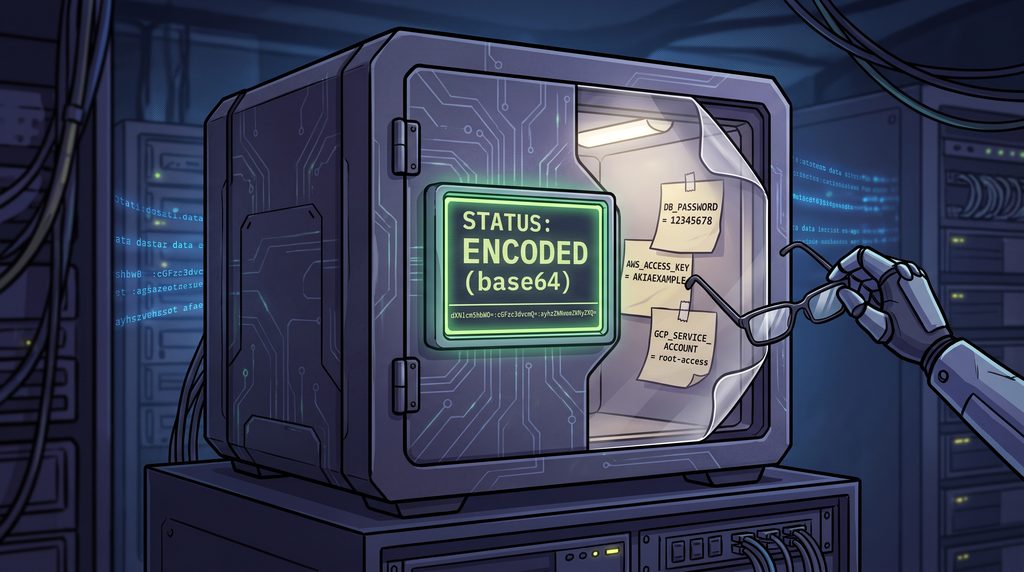
There is a widely accepted practice in modern cloud engineering that is roughly equivalent to writing your ATM pin on your forehead in Pig Latin and assuming you are safe from thieves. I am talking, of course, about the native Kubernetes secret.
If you crack open a standard Kubernetes secret manifest, you will see your database password transformed into a cryptic string of alphanumeric characters. It looks menacing. It feels secure. But it is just base64 encoding. Base64 is not encryption; it is an encoding scheme born in the late 1980s to help primitive mail servers safely transport text files without mangling them. Expecting Base64 to protect your production database credentials is like expecting a paper umbrella to protect you from a meteorite.
Yet, for years, the industry has coasted on this illusion of safety. Anyone with a terminal, broad RBAC permissions, and a passing familiarity with the echo command can decode these secrets in seconds. But the vulnerability does not stop at the API server.
The environmental hazard of the operating system gossip
Let us talk about environment variables. Passing credentials to applications via environment variables has been the default move since the dawn of the twelve factor app. It feels clean. It feels portable. It is also an absolute forensic disaster.
The Linux operating system is a chronic oversharer. Every process has a virtual file sitting at “/proc/$PID/environ”. This file contains every environment variable the process started with, neatly laid out for anyone to see. If your application crashes and dumps its memory, your database password goes with it into the logs. If an APM tool traces a slow transaction, your API keys might hitch a ride into your centralized logging dashboard.
The core objective of modern infrastructure security is surprisingly simple to state and agonizingly difficult to achieve. We must keep credentials off disks, out of environment variables, and away from static storage entirely.
The holy trinity of cloud native credential hygiene
The gold standard for fixing this mess relies on three concepts. Workload Identity, dynamic short-lived secrets, and in-memory injection.
First, we have to stop giving applications permanent passwords. Instead, we use Workload Identity. Think of this as biometric security for your code. The application does not carry a fake ID that says “I am the billing service and here is my password.” Instead, the cloud provider and the Kubernetes cluster establish trust through OIDC (OpenID Connect) federation. The kernel is already playing bouncer; it knows exactly which pod is running which service account. The infrastructure simply looks at the pod and says, “I recognize you, here is a temporary token valid for exactly ten minutes.”
Second, we use dynamic secret generation. If an application truly needs a database password, a tool like HashiCorp Vault or OpenBao intercepts the request, creates a brand new database user with a random password on the fly, and hands it over. The operational headache of manual credential rotation disappears because the credentials expire before anyone even has time to steal them.
Finally, these short-lived tokens are held solely in process memory. There is no file written to disk. There is no environment variable logged. When the pod terminates, the memory evaporates, leaving zero residual traces. The perfect crime, reversed.
Dealing with applications that refuse to evolve
This all sounds wonderful until you meet the real world. The real world is full of legacy applications that stubbornly refuse to speak native cloud identity APIs. They are the digital equivalent of that one uncle who still insists on paying for everything with exact change. They want a file on a disk, or they will simply refuse to start.
When theory crashes into stubborn codebases, we rely on a hierarchy of pragmatic workarounds.
The most elegant trick is using a sidecar or an init container to stream dynamic secrets into a shared memory volume. You tell Kubernetes to mount an emptyDir volume, but you back it with RAM instead of disk storage. The application thinks it is reading a perfectly normal file from a hard drive. In reality, it is reading a holographic projection of a password that exists only in volatile memory. If the server loses power, the secret ceases to exist.
Another popular option is the Secrets Store CSI Driver. This mounts secrets directly from cloud provider key vaults into the pod as files, completely bypassing the native Kubernetes etcd storage. It keeps the files off the permanent cluster disks while maintaining the file semantics the legacy application demands.
And then we have the External Secrets Operator (ESO). ESO is incredibly popular for GitOps workflows because it synchronizes external secrets from a secure vault directly into native Kubernetes secrets. It is highly convenient, but it comes with a caveat. You are still dumping that data into etcd storage. It is better than committing raw secrets to your git repository, but it is functionally similar to locking your front door and leaving the spare key under a very obvious welcome mat.
The uncomfortable conversation with compliance teams
Eventually, you will have to explain your architecture to a security and compliance auditor. This usually triggers an existential debate about where data residency begins and who actually holds the root key.
Compliance teams love hardware security modules (HSMs). They love knowing there is a physical, tamper-proof box in a data center somewhere holding the master key. Moving to a cloud provider’s KMS (Key Management Service) means handing that root trust over to Amazon, Google, or Microsoft.
GitOps engines like ArgoCD force teams to define clear architectural boundaries here. You have to separate the declarative dream of your infrastructure (the code sitting in your repository) from the runtime reality of the cluster. Tools like SOPS allow you to encrypt secrets directly inside your GitOps repositories, moving the security boundary entirely to decryption time.
The path away from plain environment variables is steep, and it requires a fundamental shift in how we think about identity. But continuing to rely on base64 obfuscation and environment variables is no longer a viable strategy. It is time to stop hiding our keys under the mat and start building infrastructure that simply does not need them.
For years, if two pieces of enterprise software needed to securely pass a note to each other without losing it in the hallway, they used RabbitMQ. It was the unquestioned postal service of the backend infrastructure. You set it up, you fed it a steady diet of messages, and it delivered them with the stolid reliability of a 1950s government mail carrier.
There is always something inherently funny about serious engineers trusting their most critical financial transaction data to a piece of infrastructure named after a fluffy woodland creature, but the tech industry has never been one to shy away from absurd naming conventions.
RabbitMQ is mature, it is widely understood, and it solves the traditional message broker problem beautifully. The problem we are facing right now is not that RabbitMQ has somehow forgotten how to deliver the mail or died of old age. It has not been evicted due to incompetence. The issue is simply that the building it was designed to service has fundamentally changed its zoning laws.
Then someone changed the locks on the building
To understand what happened, we have to look at the architectural carnage of the last decade. We spent years systematically smashing massive monolithic applications into hundreds of tiny, independent microservices with a hammer. We are now acting mildly surprised that all those scattered pieces desperately need to talk to each other all the time.
The sheer volume of producers and consumers has multiplied in ways that a traditional, centralized broker finds exhausting to manage. Kubernetes normalized environments where pods pop in and out of existence like subatomic particles. Multi-region deployments became the standard rather than a luxury.
We no longer just want a highly reliable queue sitting safely between two predictable applications in a heavily air-conditioned server room. We want distributed systems talking across unpredictable networks. We are looking for something different. The industry is quietly moving away from heavy message brokers toward communication fabrics.
Why NATS suddenly fits the picture
If RabbitMQ is a heavy steel filing cabinet, NATS is a hyperactive but incredibly efficient bicycle courier. NATS started out with a very lightweight model based on subjects and publish-subscribe mechanics. It allowed for asynchronous communication and request-reply patterns with almost zero ceremonial overhead.
Initially, traditional enterprise architects looked at NATS, noticed it did not store messages permanently, and patted it on the head before going back to their heavy brokers. NATS was very fast, but it lacked a sense of object permanence.
Then came JetStream. JetStream bolted persistence, durable consumers, and message replay capabilities onto NATS. Suddenly, this lightweight tool could do the heavy lifting that previously required a dedicated traditional broker.
This is the exact point where NATS started showing up at the crime scene of modern architecture. Its operational simplicity and ridiculously small footprint fit perfectly into the Kubernetes ecosystem. NATS is not gaining all this attention simply because it is fast. It is gaining traction because its fundamental model looks exactly like the systems we are currently trying to build.
Artificial intelligence and the edge make things awkward
Things get genuinely weird when we step outside the traditional data center.
Edge computing requires communicating across distributed locations that are occasionally completely disconnected from the internet. The Internet of Things multiplies your endpoints into the millions, introducing a swarm of ephemeral connections. A smart tractor in a field in Iowa needs to send telemetry data to a regional server, and it does not care if your centralized message queue is currently feeling overwhelmed.
Modern artificial intelligence platforms make the situation even more chaotic. Agentic systems require constant events, transient workers, endless request-reply loops, and real-time coordination between wildly different components.
Heavy brokers start to sweat under these conditions. They were built for predictable plumbing, not for a chaotic web of intelligent agents and intermittent edge devices. NATS, however, was designed with lightweight, distributed topologies in mind from the very beginning. You can run a NATS server on a Raspberry Pi strapped to a weather balloon, or you can run it as a massive global supercluster. It does not really care. This architectural flexibility is exactly why modern workloads naturally gravitate toward it.
Architecture is not a high school popularity contest
Before the messaging purists start writing angry emails, we need to clarify something important. RabbitMQ is not the loser in this story.
RabbitMQ continues to evolve at a very healthy pace. The introduction of quorum queues and streams has modernized the platform considerably, bringing it up to speed with contemporary distributed consensus algorithms. It remains a genuinely excellent choice for many enterprise messaging workloads and traditional task queues.
If you have a RabbitMQ platform that is running smoothly and handling your current workload without complaints, migrating away from it just because NATS is currently trending on hacker forums would be a terrible technical decision.
We often treat software tools like sports teams, desperate to declare a definitive winner. But architecture is not a popularity contest. The relevant question is never which of the two products is objectively better. The only question that matters is which tool happens to fit the shape of your current problem.
The slightly uncomfortable question at the end
The reality of modern infrastructure forces us to be honest about our defaults.
If you were sitting down to design your messaging architecture today, with Kubernetes clusters, multiple geographic regions, edge workloads, and autonomous AI agents already sitting on your requirements list, would you still start with the exact same broker you blindly chose ten years ago?
RabbitMQ is not dying. NATS is not universally replacing it. What is fundamentally shifting is what we expect our messaging infrastructure to actually do for a living. NATS is proving particularly interesting right now because it arrived at the exact right moment with a model perfectly tailored to this architectural shift.
Technologies rarely disappear because they stop working. More often, the problem simply packs its bags and quietly moves somewhere else.
A highly anticipated pair of sneakers goes on sale at exactly noon. Across the country, one thousand human index fingers descend on one thousand glass screens in the exact same millisecond.
What happens next inside the silicon of the backend is a matter of profound public misunderstanding.
The popular intuition is divided into two camps. The first camp believes the application simply clones itself like a panicked flatworm, creating one thousand exact replicas to deal with the mob. The second camp believes a single server somehow handles everyone simultaneously through sheer computational magic. Neither is true. Your API is not cloning itself, and computers are terrible at magic.
The truth is much more mundane and involves a concept we all despise in the physical world. Your server handles a thousand simultaneous users the same way a single bathroom at a highway gas station handles a busload of tourists. It forms a line. The interesting part of cloud architecture is figuring out exactly where that line forms, how long it gets, and who gets turned away when the plumbing backs up.
Where the thousand requests actually land first
Before your beautifully crafted Python or Node.js application even realizes it has visitors, the operating system kernel is already working the door. The kernel is the ultimate bouncer.
When those thousand requests arrive, they hit a single listening socket. You can think of the listen() function as the velvet rope outside a nightclub. The operating system maintains two distinct queues here (the SYN queue for handshakes in progress, and the accept queue for fully established connections waiting for your app to notice them).
This is a crucial and often uncomfortable truth for developers. The very first waiting line was not written by you. It comes standard with Linux. The size of this line is dictated by obscure system settings like somaxconn. If a thousand people show up and the kernel’s queue can only hold one hundred and twenty-eight, the bouncer simply starts ignoring the rest. The users see “Connection Refused” or their browsers just hang in a state of hopeless retransmission. Your application code never even knew they existed.
Four ways to be in several places at once
Let us assume the bouncer lets them in. Now your application has to actually do the work. How does a single program process hundreds of people asking for shoes? Historically, we have tried four different ways to solve this.
The oldest method is one process per request (think of the early days of CGI or Apache prefork). When a request comes in, the server spawns a brand new, fully isolated process. It is highly secure and historically honest, but it is the equivalent of building a brand new kitchen every time a customer orders a sandwich. It is terribly expensive, and you will run out of RAM before you sell your tenth pair of shoes.
Then we moved to threads (the traditional Java or Tomcat model). Threads are lighter. You hire multiple tellers to work behind the same counter. They share the same space and the same memory. The problem here is the memory overhead per thread and the exhaustion of context switching. The CPU spends so much time frantically turning its attention from teller A to teller B that it forgets to actually process any transactions.
Then came the single-threaded event loop (the Node.js or Nginx philosophy). This model employs one insanely fast waiter taking orders from a hundred tables and passing them to the kitchen. It is brilliant and incredibly efficient for input and output operations. But it has a fatal flaw. If that single waiter stops to solve a complex Sudoku puzzle at table four (a CPU-bound task), the other ninety-nine tables starve to death.
Finally, we have modern lightweight concurrency (Go routines, Java 21 virtual threads, Python async). This is the current favorite. It allows the system to juggle thousands of tasks by instantly pausing any task that is waiting on a database or a network call, switching to another task without the heavy overhead of traditional threads. (Python developers using Gunicorn will still boot up multiple workers because of the Global Interpreter Lock, a stubborn piece of legacy architecture that essentially forces threads to share a single speaking token).
Your web server and your application are not the same thing
A quick point of clarification that confuses junior engineers daily. Uvicorn, Gunicorn, PHP-FPM, and Tomcat are not your application. They are the managers of your application.
People love to tweak the settings on these managers. They read a blog post that says the optimal number of workers is twice the number of CPU cores plus one. Then, when traffic spikes, they panic and crank the worker count up to two hundred. Bumping your workers to two hundred does not make your application faster. It usually just makes your server run out of memory much faster, crashing the entire machine with spectacular efficiency.
The bottleneck is rarely the thing you are optimizing
You can tune your web server all day, but the web server is rarely the problem. The bottleneck is the database.
Picture those one thousand concurrent users successfully navigating the kernel queues and the web server workers, only to slam into the database connection pool. A connection pool is exactly what it sounds like. It is a small bucket of open lines to the database. You might have a thousand users, but you probably only have twenty database connections.
This brings us to Little’s Law, a concept from queuing theory that explains why traffic jams happen. Throughput is equal to concurrency divided by latency. If your database takes a long time to answer (high latency), the only way to handle a lot of users (high throughput) is to have a massive amount of concurrency. But databases hate massive concurrency.
The most counterintuitive secret in cloud architecture is that sometimes, reducing the size of your connection pool actually makes your system faster. A database trying to serve twenty queries at once is fast. A database trying to serve five hundred queries at once spends all its time thrashing its disks and managing locks, slowing everyone down. By forcing requests to wait in the app server’s line, the database can do its job efficiently.
There are invisible queues everywhere. The thread pool is a queue. The disk scheduler is a queue. DNS resolution is a queue. If you rely on an external payment provider and their API takes three seconds to respond, you now have a three-second traffic jam backing up through every single one of those queues all the way to the user’s browser.
What happens when two people buy the last one
Let us look at the moment of purchase. There is one pair of sneakers left in the database. Two separate requests arrive at the same microsecond.
If you write your code to read the stock level, subtract one in the application, and save the new number, you are going to sell the same pair of shoes twice. Request A reads “1”. Request B reads “1”. Both subtract one. Both save “0”. You now have a very angry customer and a negative inventory. This is a race condition.
You cannot trust basic reads. You need locking. You can use optimistic locking (where you check a version number before saving to ensure nobody else touched the row while you were looking at it) or pessimistic locking (where you lock the row entirely with a command like SELECT FOR UPDATE until you are finished).
And if you think your database’s default isolation level protects you from this, you are in for a bad time. The default isolation level for many databases is READ COMMITTED, which absolutely does not prevent the scenario I just described.
The user who clicks buy three times
Humans are impatient creatures. When the browser spins for more than two seconds, the user will angrily click the “Buy Now” button again. And maybe a third time for good measure. Meanwhile, your load balancer might decide a request timed out and automatically retry it behind the scenes.
One eager human and a helpful network infrastructure can easily turn a single purchase into four identical requests hitting your backend.
This is why idempotency is not just a fancy engineering word, but a core product feature. Idempotency means that doing something multiple times has the same result as doing it once. Payment processors like Stripe handle this beautifully by requiring an idempotency key (a unique string generated by the client for that specific cart). No matter how many times the frantic user clicks, the backend sees the same key, processes the charge once, and simply replies “Yes, I already did that” to the subsequent requests.
I once audited a system that lacked idempotency keys during a Black Friday sale. A small network hiccup caused the load balancer to retry requests globally for about thirty seconds. They successfully sold out their inventory, but they also charged five hundred people three times each. Reversing those charges cost them more in engineering hours and banking fees than the profit from the entire sale.
Adding more servers, and the moment it stops helping
When the queues get too long, the modern reflex is to click the autoscaling button. Autoscaling spins up fresh copies of your application on new virtual machines to help carry the load.
The problem with autoscaling is structural delay. By the time your monitoring tools notice the CPU spiking, evaluate the metric, schedule a new server, boot the operating system, pull the container image, start the application, warm up the Just-In-Time compiler, fill the local caches, and finally register with the load balancer (a process that can take three to five minutes), the sneaker drop is over. The spike has already crushed you. Autoscaling is great for the gradual increase of traffic as people wake up across a time zone. It is completely useless for a localized stampede.
Even if you scale your web servers to infinity, you eventually hit the ultimate wall. The database is still just one machine. You cannot autoscale a primary database with a slider.
Learning to say no politely
If you cannot scale fast enough, and your queues are full, you have to start rejecting people. In systems architecture, this is called load shedding.
It feels unnatural to engineers to drop traffic on purpose. But a server trying to process everything will eventually run out of memory and process nothing. Dropping five percent of your traffic to ensure the other ninety-five percent actually completes their checkout is just good triage.
You need sensible timeouts. A thirty-second timeout on a web request is just a very slow way to crash your server. You need circuit breakers that trip and instantly return errors when a downstream service is struggling, rather than making a thousand requests wait in the dark. You can use explicit queues (like SQS or Kafka) to take the order instantly, return a “202 Accepted” status to the user, and process the actual payment asynchronously when the database has room to breathe.
So, one server or a thousand copies
We return to the original question. When a thousand users arrive at the exact same microsecond, the application does not undergo spontaneous mitosis. It does not clone itself like a panicked flatworm. Biology is elegantly scalable that way. Software, regrettably, is not.
There is no computational magic to be found here. There are only network sockets, kernel bouncers, exhausted thread pools, and database locks. Everything you look at is a queue. The network card has a queue. The database has a queue. The operating system maintains a queue just to keep track of its other queues.
The job of a cloud architect is not to eliminate these lines. That is mathematically impossible. The job is more akin to being a cynical municipal planner. You decide exactly where the traffic jams should happen, how long the wait is allowed to get before it becomes embarrassing, and at what precise moment the bouncer should lock the doors and tell the remaining crowd to go home.
A server, ultimately, does not care about your limited edition sneakers or your concert tickets. It is just a box of hot silicon trying desperately to force a thousand screaming humans to do the one thing they hate most. It wants them to form a single, orderly line.