
The day the cron job fought back
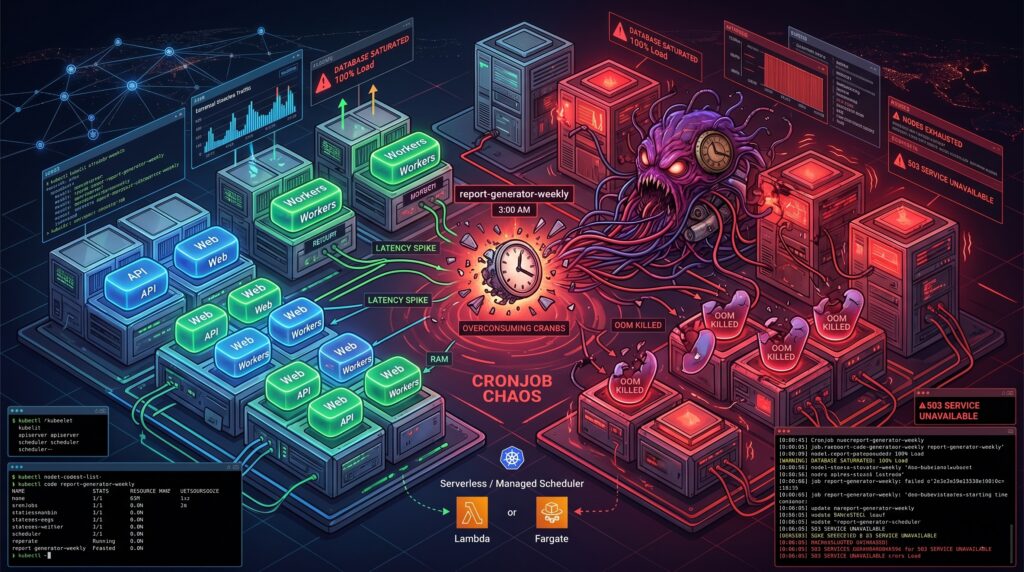
It was 3 AM on a Sunday when the primary database finally gave up. The alerts did not scream about a traffic spike or a rogue deployment. Instead, the culprit was a seemingly innocent Kubernetes CronJob named report-generator-weekly. Thanks to a subtle daylight saving time shift and a misunderstanding of how the kubelet interprets timezones, the cluster decided to spawn twenty-five concurrent instances of a highly unoptimized SQL aggregation query. The database wept, the API went down, and a dozen pagers ruined a perfectly good weekend.
Scheduled jobs can seem deceptively simple until they disrupt production. We tend to treat Kubernetes as a universal solvent for all our operational problems. If it runs containers, it should handle a little task scheduling, right? Sadly, the reality is far more complicated. Behind the scenes, the timezone handling often defaults to the kubelet’s local clock, concurrency policies are treated as polite suggestions under heavy control plane load, and failed jobs accumulate in your cluster like dirty dishes in a shared office sink. Observability is fractured across transient pods, ephemeral events, and missing logs. These “small” details are precisely how a benign script turns into an incident vector.
Resource contention and the illusion of isolation
Your scheduled job does not care about your Service Level Agreements. When you deploy a CronJob into a shared cluster, you are introducing a highly unpredictable workload into the same ring where your latency-sensitive APIs reside. Kubernetes tries its best to balance the scales, but the scheduler is only as good as the resource requests you provide.
Most scheduled jobs are spiky. They sleep for 23 hours, wake up, devour every megabyte of RAM they can reach, and then vanish. If you underprovision the memory requests to save money, the OutOfMemory killer will brutally terminate your job midway through a critical payment reconciliation. If you overprovision to stay safe, you end up paying for idle compute across your worker nodes all day long. We have all seen clusters where a five-minute data cleanup task was given the same IAM permissions and CPU priority as the core stateful application simply because “it is just a cron”. Taints, tolerations, and node affinity help, but they often create a false sense of isolation while increasing scheduling complexity.
Managed schedulers and workflow patterns to the rescue
The smartest way to run a CronJob in Kubernetes is usually to not run it in Kubernetes at all. If you are already building on a major cloud provider, you have access to tools that were specifically designed for this exact headache.
Consider decoupling the “schedule” from the “work”. Services like Cloud Scheduler in GCP, EventBridge in AWS, or Azure Logic Apps are practically bulletproof when it comes to firing a trigger at a specific time. You can wire these services to invoke a Cloud Run service, a Lambda function, or an ECS Fargate task. Yes, there is a minor trade-off regarding vendor lock-in. However, the operational peace of mind you gain by offloading scheduling logic to a managed service usually pays for itself during the first month.
For more complex scenarios where jobs depend on each other, you should look toward delay queues like SQS or Pub/Sub, or dedicated workflow engines like Temporal. When a scheduled task fails halfway through, a pure Kubernetes CronJob will either restart from scratch or die entirely. A proper workflow engine provides built-in backoff logic, idempotent execution tracking, and distributed state management. This pattern beats the traditional cron daemon every time you need reliable retries.
Hardening your jobs and the beauty of boring virtual machines
Of course, there are times when you absolutely must run scheduled jobs inside the cluster. I have also copied-pasted a CronJob YAML file at 2 AM out of sheer necessity (we have all been there). If you find yourself in this situation, you need to establish some defensive boundaries.
Start by enforcing resource quotas per cron namespace to contain the blast radius. Make idempotency checks mandatory in your application code, ensuring that a job running twice by accident does not charge a customer twice. Implement structured logging with clear correlation IDs so you can actually trace failures, and use preStop hooks for graceful shutdowns. The Kubernetes documentation clearly states that a CronJob might run a job zero times or multiple times under certain edge cases, so your code must defend itself against the infrastructure.
Alternatively, we should revive our appreciation for systemd timers on basic Virtual Machines. If you have a low-frequency, highly predictable job that is critical to your infrastructure, a lightweight VM is a fantastic home for it. Systemd timers are exceptionally reliable, the cost is completely transparent, and the blast radius is physically isolated from your stateless microservices. Reserving Kubernetes for your scalable workloads while putting the boring, critical timers on a VM is not a step backward. It is just good engineering.
A plea for architectural humility
Kubernetes is a brilliant piece of software. It is an exceptional orchestrator for stateless, auto-scaling microservices. However, it is not a magical alarm clock, and treating it as a universal cron daemon is a recipe for operational misery.
Architectural humility means picking the right tool for the job, rather than the trendiest one. The next time someone proposes adding a heavy, stateful CronJob to the production cluster, take a moment to ask the hard questions about resource profiles, failure tolerance, and observability. Sometimes, the most advanced cloud architecture decision you can make is to let a dedicated scheduling service handle the calendar, leaving your cluster free to do what it does best.