

There are two kinds of secrets in cloud security.
The first kind is the legitimate kind: a third-party API token, a password for something you do not control, a certificate you cannot simply wish into existence.
The second kind is the kind we invent because we are in a hurry: long-lived access keys, copied into a config file, then copied into a Docker image, then copied into a ticket, then copied into the attacker’s weekend plans.
This article is about refusing to participate in that second category.
Not because secrets are evil. Because static credentials are the “spare house key under the flowerpot” of AWS. Convenient, popular, and a little too generous with access for something that can be photographed.
The goal is not “no secrets exist.” The goal is no secrets live in code, in images, or in long-lived credentials.
If you do that, your security posture stops depending on perfect human behavior, which is great because humans are famously inconsistent. (We cannot all be trusted with a jar of cookies, and we definitely cannot all be trusted with production AWS keys.)
Why this works in real life
AWS already has a mechanism designed to prevent your applications from holding permanent credentials: IAM roles and temporary credentials (STS).
When your Lambda runs with an execution role, AWS hands it short-lived credentials automatically. They rotate on their own. There is nothing to copy, nothing to stash, nothing to rotate in a spreadsheet named FINAL-final-rotation-plan.xlsx.
What remains are the unavoidable secrets, usually tied to systems outside AWS. For those, you store them in AWS Secrets Manager and retrieve them at runtime. Not at build time. Not at deploy time. Not by pasting them into an environment variable and calling it “secure” because you used uppercase letters.
This gives you a practical split:
- Avoidable secrets are replaced by IAM roles and temporary credentials
- Unavoidable secrets go into Secrets Manager, encrypted and tightly scoped
The architecture in one picture
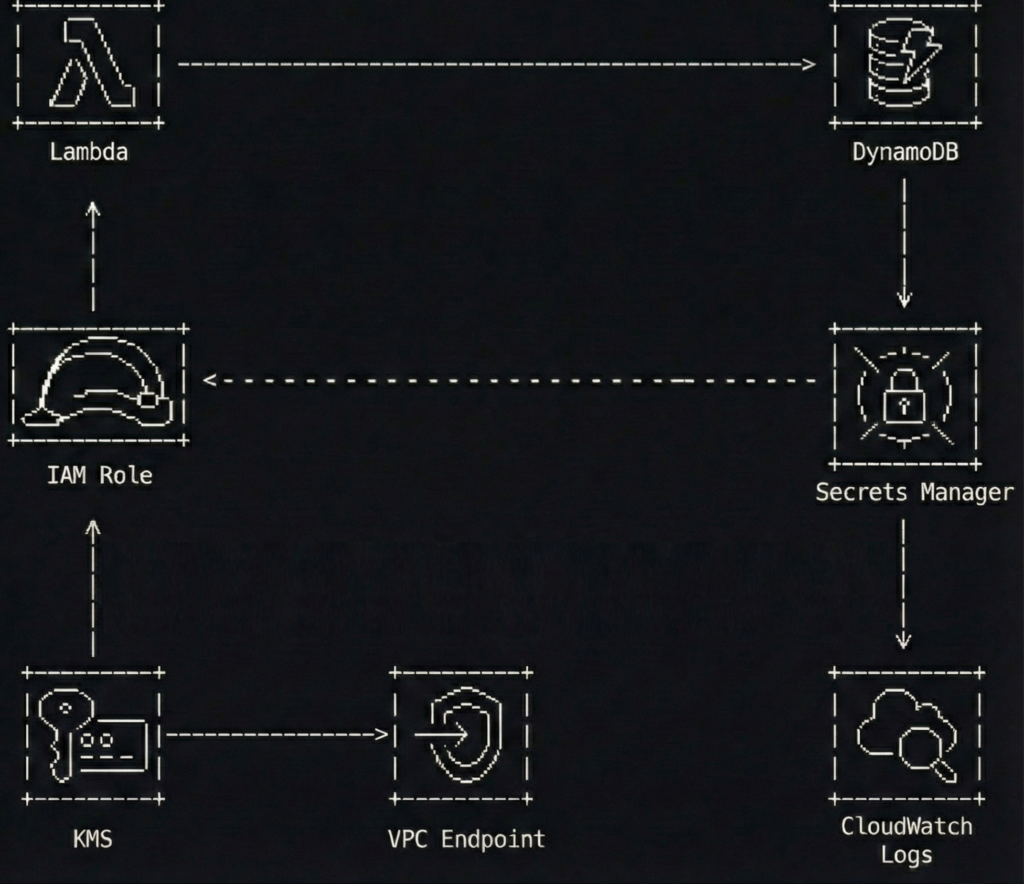
A simple flow to keep in mind:
- A Lambda function runs with an IAM execution role
- The function fetches one third-party API key from Secrets Manager at runtime
- The function calls the third-party API and writes results to DynamoDB
- Network access to Secrets Manager stays private through a VPC interface endpoint (when the Lambda runs in a VPC)
The best part is what you do not see.
No access keys. No “temporary” keys that have been temporary since 2021. No secrets baked into ZIPs or container layers.
What this protects you from
This pattern is not a magic spell. It is a seatbelt.
It helps reduce the chance of:
- Credentials leaking through Git history, build logs, tickets, screenshots, or well-meaning copy-paste
- Forgotten key rotation schedules that quietly become “never.”
- Overpowered policies that turn a small bug into a full account cleanup
- Unnecessary public internet paths for sensitive AWS API calls
Now let’s build it, step by step, with code snippets that are intentionally sanitized.
Step 1 build an IAM execution role with tight policies
The execution role is the front door key your Lambda carries.
If you give it access to everything, it will eventually use that access, if only because your future self will forget why it was there and leave it in place “just in case.”
Keep it boring. Keep it small.
Here is an example IAM policy for a Lambda that only needs to:
- write to one DynamoDB table
- read one secret from Secrets Manager
- decrypt using one KMS key (optional, depending on how you configure encryption)
{
  "Version": "2012-10-17",
  "Statement": [
    {
      "Sid": "WriteToOneTable",
      "Effect": "Allow",
      "Action": [
        "dynamodb:PutItem",
        "dynamodb:UpdateItem"
      ],
      "Resource": "arn:aws:dynamodb:eu-west-1:111122223333:table/app-results-prod"
    },
    {
      "Sid": "ReadOneSecret",
      "Effect": "Allow",
      "Action": [
        "secretsmanager:GetSecretValue"
      ],
      "Resource": "arn:aws:secretsmanager:eu-west-1:111122223333:secret:thirdparty/weather-api-key-*"
    },
    {
      "Sid": "DecryptOnlyThatKey",
      "Effect": "Allow",
      "Action": [
        "kms:Decrypt"
      ],
      "Resource": "arn:aws:kms:eu-west-1:111122223333:key/12345678-90ab-cdef-1234-567890abcdef",
      "Condition": {
        "StringEquals": {
          "kms:ViaService": "secretsmanager.eu-west-1.amazonaws.com"
        }
      }
    }
  ]
}
A few notes that save you from future regret:
- The secret ARN ends with -* because Secrets Manager appends a random suffix.
- The KMS condition helps ensure the key is used only through Secrets Manager, not as a general-purpose decryption service.
- You can skip the explicit kms:Decrypt statement if you use the AWS-managed key and accept the default behavior, but customer-managed keys are common in regulated environments.
Step 2 store the unavoidable secret properly
Secrets Manager is not a place to dump everything. It is a place to store what you truly cannot avoid.
A third-party API key is a perfect example because IAM cannot replace it. AWS cannot assume a role in someone else’s SaaS.
Use a JSON secret so you can extend it later without creating a new secret every time you add a field.
{
  "api_key": "REDACTED-EXAMPLE-TOKEN"
}
If you like the CLI (and I do, because buttons are too easy to misclick), create the secret like this:
aws secretsmanager create-secret \
  --name "thirdparty/weather-api-key" \
  --description "Token for the Weatherly API used by the ingestion Lambda" \
  --secret-string '{"api_key":"REDACTED-EXAMPLE-TOKEN"}' \
  --region eu-west-1
Then configure:
- encryption with a customer-managed KMS key if required
- rotation if the provider supports it (rotation is amazing when it is real, and decorative when the vendor does not allow it)
If the vendor does not support rotation, you still benefit from central storage, access control, audit logging, and removing the secret from code.
Step 3 lock down secret access with a resource policy
Identity-based policies on the Lambda role are necessary, but resource policies are a nice extra lock.
Think of it like this: your role policy is the key. The resource policy is the bouncer who checks the wristband.
Here is a resource policy that allows only one role to read the secret.
{
  "Version": "2012-10-17",
  "Statement": [
    {
      "Sid": "AllowOnlyIngestionRole",
      "Effect": "Allow",
      "Principal": {
        "AWS": "arn:aws:iam::111122223333:role/lambda-ingestion-prod"
      },
      "Action": "secretsmanager:GetSecretValue",
      "Resource": "*"
    },
    {
      "Sid": "DenyEverythingElse",
      "Effect": "Deny",
      "Principal": "*",
      "Action": "secretsmanager:GetSecretValue",
      "Resource": "*",
      "Condition": {
        "StringNotEquals": {
          "aws:PrincipalArn": "arn:aws:iam::111122223333:role/lambda-ingestion-prod"
        }
      }
    }
  ]
}
This is intentionally strict. Strict is good. Strict is how you avoid writing apology emails.
Step 4 keep Secrets Manager traffic private with a VPC endpoint
If your Lambda runs inside a VPC, it will not automatically have internet access. That is often the point.
In that case, you do not want the function reaching Secrets Manager through a NAT gateway if you can avoid it. NAT works, but it is like walking your valuables through a crowded shopping mall because the back door is locked.
Use an interface VPC endpoint for Secrets Manager.
Here is a Terraform example (sanitized) that creates the endpoint and limits access using a dedicated security group.
resource "aws_security_group" "secrets_endpoint_sg" {
  name        = "secrets-endpoint-sg"
  description = "Allow HTTPS from Lambda to Secrets Manager endpoint"
  vpc_id      = aws_vpc.main.id

  ingress {
    from_port       = 443
    to_port         = 443
    protocol        = "tcp"
    security_groups = [aws_security_group.lambda_sg.id]
  }

  egress {
    from_port   = 0
    to_port     = 0
    protocol    = "-1"
    cidr_blocks = ["0.0.0.0/0"]
  }
}

resource "aws_vpc_endpoint" "secretsmanager" {
  vpc_id              = aws_vpc.main.id
  service_name        = "com.amazonaws.eu-west-1.secretsmanager"
  vpc_endpoint_type   = "Interface"
  subnet_ids          = [aws_subnet.private_a.id, aws_subnet.private_b.id]
  private_dns_enabled = true
  security_group_ids  = [aws_security_group.secrets_endpoint_sg.id]
}
If your Lambda is not in a VPC, you do not need this step. The function will reach Secrets Manager over AWS’s managed network path by default.
If you want to go further, consider adding a DynamoDB gateway endpoint too, so your function can write to DynamoDB without touching the public internet.
Step 5 retrieve the secret at runtime without turning logs into a confession
This is where many teams accidentally reinvent the problem.
They remove the secret from the code, then log it. Or they put it in an environment variable because “it is not in the repository,” which is a bit like saying “the spare key is not under the flowerpot, it is under the welcome mat.”
The clean approach is:
- store only the secret name (not the secret value) as configuration
- retrieve the value at runtime
- cache it briefly to reduce calls and latency
- never print it, even when debugging, especially when debugging
Here is a Python example for AWS Lambda with a tiny TTL cache.
import json
import os
import time
import boto3

_secrets_client = boto3.client("secretsmanager")
_cached_value = None
_cached_until = 0

SECRET_ID = os.getenv("THIRDPARTY_SECRET_ID", "thirdparty/weather-api-key")
CACHE_TTL_SECONDS = int(os.getenv("SECRET_CACHE_TTL_SECONDS", "300"))


def _get_api_key() -> str:
    global _cached_value, _cached_until

    now = int(time.time())
    if _cached_value and now < _cached_until:
        return _cached_value

    resp = _secrets_client.get_secret_value(SecretId=SECRET_ID)
    payload = json.loads(resp["SecretString"])

    api_key = payload["api_key"]
    _cached_value = api_key
    _cached_until = now + CACHE_TTL_SECONDS
    return api_key


def lambda_handler(event, context):
    api_key = _get_api_key()

    # Use the key without ever logging it
    results = call_weatherly_api(api_key=api_key, city=event.get("city", "Seville"))

    write_to_dynamodb(results)

    return {
        "status": "ok",
        "items": len(results) if hasattr(results, "__len__") else 1
    }
This snippet is intentionally short. The important part is the pattern:
- minimal secret access
- controlled cache
- zero secret output
If you prefer a library, AWS provides a Secrets Manager caching client for some runtimes, and AWS Lambda Powertools can help with structured logging. Use them if they fit your stack.
Step 6 make security noisy with logs and alarms
Security without visibility is just hope with a nicer font.
At a minimum:
- enable CloudTrail in the account
- ensure Secrets Manager events are captured
- alert on unusual secret access patterns
A simple and practical approach is a CloudWatch metric filter for GetSecretValue events coming from unexpected principals. Another is to build a dashboard showing:
- Lambda errors
- Secrets Manager throttles
- sudden spikes in secret reads
Here is a tiny Terraform example that keeps your Lambda logs from living forever (because storage is forever, but your attention span is not).
resource "aws_cloudwatch_log_group" "lambda_logs" {
  name              = "/aws/lambda/lambda-ingestion-prod"
  retention_in_days = 14
}
Also consider:
- IAM Access Analyzer to spot risky resource policies
- AWS Config rules or guardrails if your organization uses them
- an alarm on unexpected NAT data processing if you intended to keep traffic private
Common mistakes I have made, so you do not have to
I am listing these because I have either done them personally or watched them happen in slow motion.
- Using a wildcard secret policy
secretsmanager:GetSecretValue on * feels convenient until it is a breach multiplier. - Putting secret values into environment variables
Environment variables are not evil, but they are easy to leak through debugging, dumps, tooling, or careless logging. Store secret names there, not secret contents. - Retrieving secrets at build time
Build logs live forever in the places you forget to clean. Runtime retrieval keeps secrets out of build systems. - Logging too much while debugging
The fastest way to leak a secret is to print it “just once.” It will not be just once. - Skipping the endpoint and relying on NAT by accident
The NAT gateway is not evil either. It is just an expensive and unnecessary hallway if a private door exists.
A two minute checklist you can steal
- Your Lambda uses an IAM execution role, not access keys
- The role policy scopes Secrets Manager access to one secret ARN pattern
- The secret has a resource policy that only allows the expected role
- Secrets are encrypted with KMS when required
- The secret value is never stored in code, images, build logs, or environment variables
- If Lambda runs in a VPC, you use an interface VPC endpoint for Secrets Manager
- You have CloudTrail enabled and you can answer “who accessed this secret” without guessing
Extra thoughts
If you remove long-lived credentials from your applications, you remove an entire class of problems.
You stop rotating keys that should never have existed in the first place.
You stop pretending that “we will remember to clean it up later” is a security strategy.
And you get a calmer life, which is underrated in engineering.
Let IAM handle the secrets you can avoid.
Then let Secrets Manager handle the secrets you cannot.
And let your code do what it was meant to do: process data, not babysit keys like they are a toddler holding a permanent marker.