
RBAC

RBAC is not least privilege, and your cluster is the proof

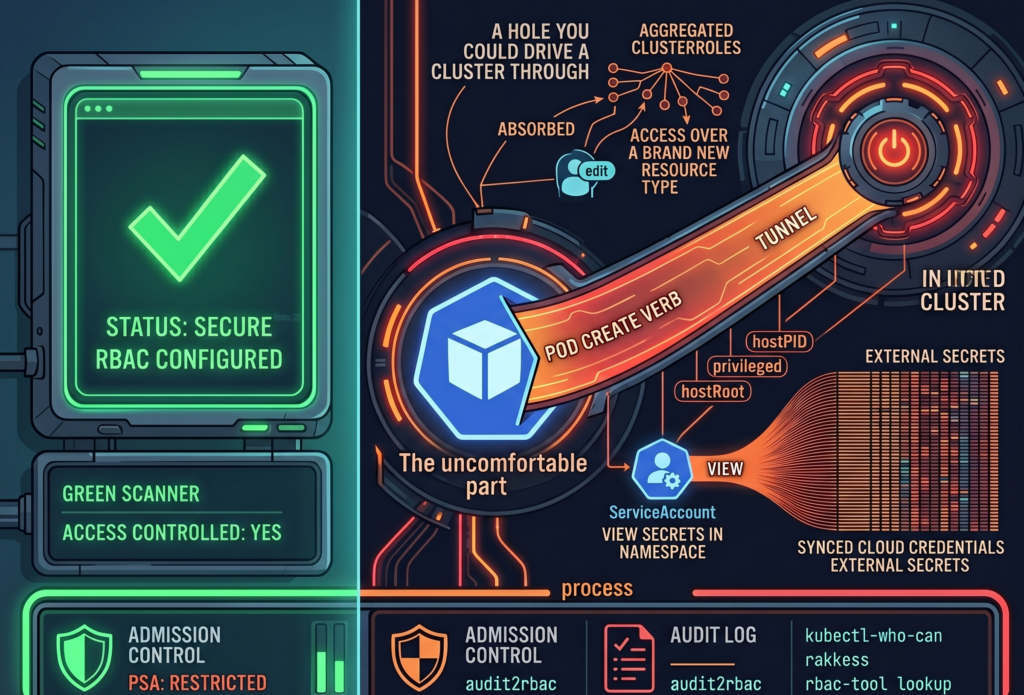
Your security scanner ran last night. It came back green. RBAC is configured, there are no critical findings, and you closed the tab with the quiet satisfaction of someone who has done the responsible thing. The cluster is locked down. You can go to lunch.

Here is the uncomfortable part. A green scanner answers the question “Is access controlled?” It does not answer the question “Is access minimal?” Those are different questions, and most teams conflate them because the first one is easy to check and the second one requires reading things nobody wants to read on a Tuesday.

RBAC answers the first. Least privilege requires answering both. And a perfectly valid RBAC configuration can be, at the very same time, a perfectly generous one. The scanner has no opinion about generosity.

The ClusterRole you inherited from a Helm chart in March

Kubernetes ships three aggregated ClusterRoles out of the box (admin, edit, view), and they have a quietly alarming property. They absorb permissions. Any ClusterRole carrying the label ‘rbac.authorization.k8s.io/aggregate-to-edit: “true”’ gets automatically folded into ‘edit’, with no human in the loop and no diff to review.

This is convenient right up until it is not. When you installed that operator back in March, its Helm chart shipped a CRD and a ClusterRole with the aggregation label attached, because that is the polite, idiomatic way to do it. From the moment ‘helm install’ finished, every subject bound to ‘edit’ in your cluster silently gained permissions over a brand new resource type. Nobody approved it. Nobody saw it. The controller did exactly what it was designed to do, which is the part that should worry you.

So the RoleBinding still says ‘edit’. The word has not changed. What it grants has, several times, across several chart upgrades, and the only record of the expansion is scattered across ClusterRole objects nobody has opened since they were applied.

The takeaway is small and annoying: every time you install a chart, check what it aggregated. ‘kubectl get clusterrole -l rbac.authorization.k8s.io/aggregate-to-edit=true’ is two minutes of your life and occasionally a genuine surprise.

That ServiceAccount reads secrets, all of them, probably

Consider a ServiceAccount with ‘get’ on secrets in a single namespace. On paper, this looks narrow and tidy. The reviewer who approved it was right to approve it. The problem is that RBAC grants do not live in isolation; they live next to whatever else is running in that namespace.

If that namespace also hosts External Secrets Operator, a Vault Agent sidecar, or a CSI secrets driver, the secrets sitting there are not application trivia. They are the synced, materialized credentials that those tools pulled from somewhere more important. A grant that reads “can view secrets in ‘team-a’” can, depending on the architecture around it, mean “can read the cloud provider credentials that External Secrets faithfully copied into ‘team-a’ thirty seconds ago.”

Nothing here is broken. Every component is behaving as documented. That is exactly why it slips past review: each piece is reasonable, and the risk only exists in the seam between them, where no single Role definition is looking.

So when you audit a secrets grant, do not read the Role. Read the room. Ask what else lives in that namespace and what those neighbors keep in their pockets.

Creating a Pod sometimes creates a root shell on the node

This is the one people refuse to believe until you show them.

If Pod Security Admission is not enforced in ‘restricted’ mode, a subject with ‘create’ on pods is, functionally, a subject with a path to the node. They can define a pod that mounts the host root filesystem as a volume, sets ‘hostPID: true’, runs ‘privileged: true’, or maps a host port to quietly intercept traffic. From inside that pod, the node is no longer a node; it is a directory.

None of this is a vulnerability. There is no CVE to patch, because Kubernetes is doing precisely what the spec permits. The escalation lives in the gap between two true statements: “we have RBAC” and “nobody can reach the node.” Both can be accurate. Together, they can still be a hole you could drive a cluster through.

The fix is not more RBAC. It is admission control. Enforce PSA ‘restricted’ as the namespace default, and treat every exception as a decision someone wrote down and owns, rather than a default nobody chose.

Three commands that will ruin your afternoon

Theory is comfortable. Here is the part where you actually look.

‘kubectl-who-can’ answers the blunt question: who can perform this verb on this resource, right now. ‘kubectl who-can create pods -n production’ is a fast way to find out that the list is longer than you remembered.

‘rakkess’ produces a full access matrix for a given subject, so you can stare at an entire grid of green checkmarks belonging to a ServiceAccount that, in principle, only needed to read a config map.

‘rbac-tool lookup’ lists everything a specific subject can do across the whole cluster, which is the tool you run when you have a name and a bad feeling.

I will set an honest expectation. The first time you run any of these against a cluster older than a year, you will find at least one thing nobody intended, and there is a decent chance it will be something you granted. This is not a moral failing. It is entropy. Permissions accrete the same way junk drawers do, one reasonable decision at a time.

The scanner will still be green, that is no longer the point

Here is where I am supposed to hand you a fix that makes the scary parts go away. I cannot, because least privilege in Kubernetes is not a configuration state you reach and then defend. It is a process you keep doing, slightly grudgingly, forever.

Start subjects at zero and grant only what the audit log proves they actually use. Tools like ‘audit2rbac’ can generate tight RBAC from real API server audit events, which is to say from evidence rather than from optimism. Enforce PSA ‘restricted’ by default. Audit aggregated ClusterRoles every time you install a chart. Rotate ServiceAccount tokens, because a credential that never expires is just a future incident with good patience.

Do all of that, and run the scanner again. It will still be green. It was always going to be green. The result has not changed at all. The only thing that has changed is the question you now know to ask, and that, inconveniently, was the whole job.

There is no universal answer here, only better-informed trade-offs, and the faint suspicion that your next audit will find something too. It usually does.


Understanding Kubernetes RBAC: Safeguarding Your Cluster

Role-Based Access Control (RBAC) stands as a cornerstone for securing and managing access within the Kubernetes ecosystem. Think of Kubernetes as a bustling city, with myriad services, pods, and nodes acting like different entities within it. Just like a city needs a comprehensive system to manage who can access what – be it buildings, resources, or services – Kubernetes requires a robust mechanism to control access to its numerous resources. This is where RBAC comes into play.

RBAC is not just a security feature; it’s a fundamental framework that helps maintain order and efficiency in Kubernetes’ complex environments. It’s akin to a sophisticated security system, ensuring that only authorized individuals have access to specific areas, much like keycard access in a high-security building. In Kubernetes, these “keycards” are roles and permissions, meticulously defined and assigned to users or groups.

This system is vital in a landscape where operations are distributed and responsibilities are segmented. RBAC allows granular control over who can do what, which is crucial in a multi-tenant environment. Without RBAC, managing permissions would be akin to leaving the doors of a secure facility unlocked, potentially leading to unauthorized access and chaos.

At its core, Kubernetes RBAC revolves around a few key concepts: defining roles with specific permissions, assigning these roles to users or groups, and ensuring that access rights are precisely tailored to the needs of the cluster. This ensures that operations within the Kubernetes environment are not only secure but also efficient and streamlined.

By embracing RBAC, organizations step into a realm of enhanced security, where access is not just controlled but intelligently managed. It’s a journey from a one-size-fits-all approach to a customized, role-based strategy that aligns with the diverse and dynamic needs of Kubernetes clusters. In the following sections, we’ll delve deeper into the intricacies of RBAC, unraveling its layers and revealing how it fortifies Kubernetes environments against security threats while facilitating smooth operational workflows.

User Accounts vs. Service Accounts in RBAC: A unique aspect of Kubernetes RBAC is its distinction between user accounts (human users or groups) and service accounts (software resources). This broad approach to defining “subjects” in RBAC policies is different from many other systems that primarily focus on human users.

Flexible Resource Definitions: RBAC in Kubernetes is notable for its flexibility in defining resources, which can include pods, logs, ingress controllers, or custom resources. This is in contrast to more restrictive systems that manage predefined resource types.

Roles and ClusterRoles: RBAC differentiates between Roles, which are namespace-specific, and ClusterRoles, which apply to the entire cluster. This distinction allows for more granular control of permissions within namespaces and broader control at the cluster level.

  • Role Example: A Role in the “default” namespace granting read access to pods:
apiVersion: rbac.authorization.k8s.io/v1
kind: Role
metadata:
  namespace: default
  name: pod-reader
rules:
- apiGroups: [""]
  resources: ["pods"]
  verbs: ["get", "watch", "list"]
  • ClusterRole Example: A ClusterRole granting read access to secrets across all namespaces:
apiVersion: rbac.authorization.k8s.io/v1
kind: ClusterRole
metadata:
  name: secret-reader
rules:
- apiGroups: [""]
  resources: ["secrets"]
  verbs: ["get", "watch", "list"]

Managing Permissions with Verbs:

In Kubernetes RBAC, the concept of “verbs” is pivotal to how access controls are defined and managed. These verbs are essentially the actions that can be performed on resources within the Kubernetes environment. Unlike traditional access control systems that may offer a binary allow/deny model, Kubernetes RBAC verbs introduce a nuanced and highly granular approach to defining permissions.

Understanding Verbs in RBAC:

  1. Core Verbs:
    • Get: Allows reading a specific resource.
    • List: Permits listing all instances of a resource.
    • Watch: Enables watching changes to a particular resource.
    • Create: Grants the ability to create new instances of a resource.
    • Update: Provides permission to modify existing resources.
    • Patch: Similar to update, but for making partial changes.
    • Delete: Allows the removal of specific resources.
  2. Extended Verbs:
    • Exec: Permits executing commands in a container.
    • Bind: Enables linking a role to specific subjects.

Practical Application of Verbs:

The power of verbs in RBAC lies in their ability to define precisely what a user or a service account can do with each resource. For example, a role that includes the “get,” “list,” and “watch” verbs for pods would allow a user to view pods and receive updates about changes to them but would not permit the user to create, update, or delete pods.

Customizing Access with Verbs:

This system allows administrators to tailor access rights at a very detailed level. For instance, in a scenario where a team needs to monitor deployments but should not change them, their role can include verbs like “get,” “list,” and “watch” for deployments, but exclude “create,” “update,” or “delete.”

Flexibility and Security:

This flexibility is crucial for maintaining security in a Kubernetes environment. By assigning only the necessary permissions, administrators can adhere to the principle of least privilege, reducing the risk of unauthorized access or accidental modifications.

Verbs and Scalability:

Moreover, verbs in Kubernetes RBAC make the system scalable. As the complexity of the environment grows, administrators can continue to manage permissions effectively by defining roles with the appropriate combination of verbs, tailored to the specific needs of users and services.

RBAC Best Practices: Implementing RBAC effectively involves understanding and applying best practices, such as ensuring least privilege, regularly auditing and reviewing RBAC settings, and understanding the implications of role bindings within and across namespaces.

Real-World Use Case: Imagine a scenario where an organization needs to limit developers’ access to specific namespaces for deploying applications while restricting access to other cluster areas. By defining appropriate Roles and RoleBindings, Kubernetes RBAC allows precise control over what developers can do, significantly enhancing both security and operational efficiency.

The Synergy of RBAC and ServiceAccounts in Kubernetes Security

In the realm of Kubernetes, RBAC is not merely a feature; it’s the backbone of access management, playing a crucial role in maintaining a secure and efficient operation. However, to fully grasp the essence of Kubernetes security, one must understand the synergy between RBAC and ServiceAccounts.

Understanding ServiceAccounts:

ServiceAccounts in Kubernetes are pivotal for automating processes within the cluster. They are special kinds of accounts used by applications and pods, as opposed to human operators. Think of ServiceAccounts as robot users – automated entities performing specific tasks in the Kubernetes ecosystem. These tasks range from running a pod to managing workloads or interacting with the Kubernetes API.

The Role of ServiceAccounts in RBAC:

Where RBAC is the rulebook defining what can be done, ServiceAccounts are the players acting within those rules. RBAC policies can be applied to ServiceAccounts, thereby regulating the actions these automated players can take. For example, a ServiceAccount tied to a pod can be granted permissions through RBAC to access certain resources within the cluster, ensuring that the pod operates within the bounds of its designated privileges.

Integrating ServiceAccounts with RBAC:

Integrating ServiceAccounts with RBAC allows Kubernetes administrators to assign specific roles to automated processes, thereby providing a nuanced and secure access control system. This integration ensures that not only are human users regulated, but also that automated processes adhere to the same stringent security protocols.

Practical Applications. The CI/CD Pipeline:

In a Continuous Integration and Continuous Deployment (CI/CD) pipeline, tasks like code deployment, automated testing, and system monitoring are integral. These tasks are often automated and run within the Kubernetes environment. The challenge lies in ensuring these automated processes have the necessary permissions to perform their functions without compromising the security of the Kubernetes cluster.

Role of ServiceAccounts:

  1. Automated Task Execution: ServiceAccounts are perfect for CI/CD pipelines. Each part of the pipeline, be it a deployment process or a testing suite, can have its own ServiceAccount. This ensures that the permissions are tightly scoped to the needs of each task.
  2. Specific Permissions: For instance, a ServiceAccount for a deployment tool needs permissions to update pods and services, while a monitoring tool’s ServiceAccount might only need to read pod metrics and log data.

Applying RBAC for Fine-Grained Control:

  • Defining Roles: With RBAC, specific roles can be created for different stages of the CI/CD pipeline. These roles define precisely what operations are permissible by the ServiceAccount associated with each stage.
  • Example Role for Deployment: A role for the deployment stage may include verbs like ‘create’, ‘update’, and ‘delete’ for resources such as pods and deployments.
kind: Role
apiVersion: rbac.authorization.k8s.io/v1
metadata:
  namespace: deployment
  name: deployment-manager
rules:
- apiGroups: ["apps", ""]
  resources: ["deployments", "pods"]
  verbs: ["create", "update", "delete"]
  • Binding Roles to ServiceAccounts: Each role is then bound to the appropriate ServiceAccount, ensuring that the permissions align with the task’s requirements.
kind: RoleBinding
apiVersion: rbac.authorization.k8s.io/v1
metadata:
  name: deployment-manager-binding
  namespace: deployment
subjects:
- kind: ServiceAccount
  name: deployment-service-account
  namespace: deployment
roleRef:
  kind: Role
  name: deployment-manager
  apiGroup: rbac.authorization.k8s.io
  • Isolation and Security: This setup not only isolates each task’s permissions but also minimizes the risk of a security breach. If a part of the pipeline is compromised, the attacker has limited permissions, confined to a specific role and namespace.

Enhancing CI/CD Security:

  1. Least Privilege Principle: The principle of least privilege is effectively enforced. Each ServiceAccount has only the permissions necessary to perform its designated task, nothing more.
  2. Audit and Compliance: The explicit nature of RBAC roles and ServiceAccount bindings makes it easier to audit and ensure compliance with security policies.
  3. Streamlined Operations: Administrators can manage and update permissions as the pipeline evolves, ensuring that the CI/CD processes remain efficient and secure.

The Harmony of Automation and Security:

In conclusion, the combination of RBAC and ServiceAccounts forms a harmonious balance between automation and security in Kubernetes. This synergy ensures that every action, whether performed by a human or an automated process, is under the purview of meticulously defined permissions. It’s a testament to Kubernetes’ foresight in creating an ecosystem where operational efficiency and security go hand in hand.