
October 2025

Parenting your Kubernetes using hierarchical namespaces

Let’s be honest. Your Kubernetes cluster, on its bad days, feels less like a sleek, futuristic platform and more like a chaotic shared apartment right after college. The frontend team is “borrowing” CPU from the backend team, the analytics project left its sensitive data lying around in a public bucket, and nobody knows who finished the last of the memory reserves.

You tried to bring order. You dutifully handed out digital rooms to each team using namespaces. For a while, there was peace. But then those teams had their own little sub-projects, staging, testing, that weird experimental feature no one talks about, and your once-flat world devolved into a sprawling city with no zoning laws. The shenanigans continued, just inside slightly smaller boxes.

What you need isn’t more rules scribbled on a whiteboard. You need a family tree. It’s time to introduce some much-needed parental supervision into your cluster. It’s time for Hierarchical Namespaces.

The origin of the namespace rebellion

In the beginning, Kubernetes gave us namespaces, and they were good. The goal was simple: create virtual walls to stop teams from stealing each other’s lunch (metaphorically speaking, of course). Each namespace was its own isolated island, a sovereign nation with its own rules. This “flat earth” model worked beautifully… until it didn’t.

As organizations scaled, their clusters turned into bustling archipelagos of hundreds of namespaces. Managing them felt like being an air traffic controller for a fleet of paper airplanes in a hurricane. Teams realized that a flat structure was basically a free-for-all party where every guest could raid the fridge, as long as they stayed in their designated room. There was no easy way to apply a single rule, like a network policy or a set of permissions, to a group of related namespaces. The result was a maddening copy-paste-a-thon of YAML files, a breeding ground for configuration drift and human error.

The community needed a way to group these islands, to draw continents. And so, the Hierarchical Namespace Controller (HNC) was born, bringing a simple, powerful concept to the table: namespaces can have parents.

What this parenting gig gets you

Adopting a hierarchical structure isn’t just about satisfying your inner control freak. It comes with some genuinely fantastic perks that make cluster management feel less like herding cats.

  • The “Because I said so” principle: This is the magic of policy inheritance. Any Role, RoleBinding, or NetworkPolicy you apply to a parent namespace automatically cascades down to all its children and their children, and so on. It’s the parenting dream: set a rule once, and watch it magically apply to everyone. No more duplicating RBAC roles for the dev, staging, and testing environments of the same application.
  • The family budget: You can set a resource quota on a parent namespace, and it becomes the total budget for that entire branch of the family tree. For instance, team-alpha gets 100 CPU cores in total. Their dev and qa children can squabble over that allowance, but together, they can’t exceed it. It’s like giving your kids a shared credit card instead of a blank check.
  • Delegated authority: You can make a developer an admin of a “team” namespace. Thanks to inheritance, they automatically become an admin of all the sub-namespaces under it. They get the freedom to manage their own little kingdoms (staging, testing, feature-x) without needing to ping a cluster-admin for every little thing. You’re teaching them responsibility (while keeping the master keys to the kingdom, of course).

Let’s wrangle some namespaces

Convinced? I thought so. The good news is that bringing this parental authority to your cluster isn’t just a fantasy. Let’s roll up our sleeves and see how it works.

Step 0: Install the enforcer

Before we can start laying down the law, we need to invite the enforcer. The Hierarchical Namespace Controller (HNC) doesn’t come built-in with Kubernetes. You have to install it first.

You can typically install the latest version with a single kubectl command:

kubectl apply -f [https://github.com/kubernetes-sigs/hierarchical-namespaces/releases/latest/download/hnc-manager.yaml](https://github.com/kubernetes-sigs/hierarchical-namespaces/releases/latest/download/hnc-manager.yaml)

Wait a minute for the controller to be up and running in its own hnc-system namespace. Once it’s ready, you’ll have a new superpower: the kubectl hns plugin.

Step 1: Create the parent namespace

First, let’s create a top-level namespace for a project. We’ll call it project-phoenix. This will be our proud parent.

kubectl create namespace project-phoenix

Step 2: Create some children

Now, let’s give project-phoenix a couple of children: staging and testing. Wait, what’s that hns command? That’s not your standard kubectl. That’s the magic wand the HNC just gave you. You’re telling it to create a staging namespace and neatly tuck it under its parent.

kubectl hns create staging -n project-phoenix
kubectl hns create testing -n project-phoenix

Step 3: Admire your family tree

To see your beautiful new hierarchy in all its glory, you can ask HNC to draw you a picture.

kubectl hns tree project-phoenix

You’ll get a satisfyingly clean ASCII art diagram of your new family structure:

You can even create grandchildren. Let’s give the staging namespace its own child for a specific feature branch.

kubectl hns create feature-login-v2 -n staging
kubectl hns tree project-phoenix

And now your tree looks even more impressive:

Step 4 Witness the magic of inheritance

Let’s prove that this isn’t all smoke and mirrors. We’ll create a Role in the parent namespace that allows viewing Pods.

# viewer-role.yaml
apiVersion: rbac.authorization.k8s.io/v1
kind: Role
metadata:
  name: pod-viewer
  namespace: project-phoenix
rules:
- apiGroups: [""]
  resources: ["pods"]
  verbs: ["get", "list", "watch"]

Apply it:

kubectl apply -f viewer-role.yaml

Now, let’s give a user, let’s call her jane.doe, that role in the parent namespace.

kubectl create rolebinding jane-viewer --role=pod-viewer --user=jane.doe -n project-phoenix

Here’s the kicker. Even though we only granted Jane permission in project-phoenix, she can now magically view pods in the staging and feature-login-v2 namespaces as well.

# This command would work for Jane!
kubectl auth can-i get pods -n staging --as=jane.doe
# YES

# And even in the grandchild namespace!
kubectl auth can-i get pods -n feature-login-v2 --as=jane.doe
# YES

No copy-pasting required. The HNC saw the binding in the parent and automatically propagated it down the entire tree. That’s the power of parenting.

A word of caution from a fellow parent

As with real parenting, this new power comes with its own set of challenges. It’s not a silver bullet, and you should be aware of a few things before you go building a ten-level deep namespace dynasty.

  • Complexity can creep in: A deep, sprawling tree of namespaces can become its own kind of nightmare to debug. Who has access to what? Which quota is affecting this pod? Keep your hierarchy logical and as flat as you can get away with. Just because you can create a great-great-great-grandchild namespace doesn’t mean you should.
  • Performance is not free: The HNC is incredibly efficient, but propagating policies across thousands of namespaces does have a cost. For most clusters, it’s negligible. For mega-clusters, it’s something to monitor.
  • Not everyone obeys the parents: Most core Kubernetes resources (RBAC, Network Policies, Resource Quotas) play nicely with HNC. But not all third-party tools or custom controllers are hierarchy-aware. They might only see the flat world, so always test your specific tools.

Go forth and organize

Hierarchical Namespaces are the organizational equivalent of finally buying drawer dividers for that one kitchen drawer, you know the one. The one where the whisk is tangled with the batteries and a single, mysterious key. They transform your cluster from a chaotic free-for-all into a structured, manageable hierarchy that actually reflects how your organization works. It’s about letting you set rules with confidence and delegate with ease.

So go ahead, embrace your inner cluster parent. Bring some order to the digital chaos. Your future self, the one who isn’t spending a Friday night debugging a rogue pod in the wrong environment, will thank you. Just don’t be surprised when your newly organized child namespaces start acting like teenagers, asking for the production Wi-Fi password or, heaven forbid, the keys to the cluster-admin car.After all, with great power comes great responsibility… and a much, much cleaner kubectl get ns output.
Trust your images again with Docker Scout

Containers behave perfectly until you check their pockets. Then you find an elderly OpenSSL and a handful of dusty transitive dependencies that they swore they did not know. Docker Scout is the friend who quietly pats them down at the door, lists what they are carrying, and whispers what to swap so the party does not end with a security incident.

This article is a field guide for getting value from Docker Scout without drowning readers in output dumps. It keeps the code light, focuses on practical moves, and uses everyday analogies instead of cosmic prophecy. By the end, you will have a small set of habits that reduce late‑night pages and cut vulnerability noise to size.

Why scanners overwhelm and what to keep

Most scanners are fantastic at finding problems and terrible at helping you fix the right ones first. You get a laundry basket full of CVEs, you sort by severity, and somehow the pile never shrinks. What you actually need is:

  • Context plus action: show the issues and show exactly what to change, especially base images.
  • Comparison across builds: did this PR make things better or worse?
  • A tidy SBOM: not a PDF doorstop, an artifact you can diff and feed into tooling.

Docker Scout leans into those bits. It plugs into the Docker tools you already use, gives you short summaries when you need them, and longer receipts when auditors appear.

What Docker Scout actually gives you

  • Quick risk snapshot with counts by severity and a plain‑language hint if a base image refresh will clear most of the mess.
  • Targeted recommendations that say “move from X to Y” rather than “good luck with 73 Mediums.”
  • Side‑by‑side comparisons so you can fail a PR only when it truly regresses security.
  • SBOM on demand in useful formats for compliance and diffs.

That mix turns CVE management from whack‑a‑mole into something closer to doing the dishes with a proper rack. The plates dry, nothing falls on the floor, and you get your counter space back.

A five-minute tour

Keep this section handy. It is the minimum set of commands that deliver outsized value.

# 1) Snapshot risk and spot low‑hanging fruit
# Tip: use a concrete tag to keep comparisons honest
docker scout quickview acme/web:1.4.2

# 2) See only the work that unblocks a release
# Critical and High issues that already have fixes
docker scout cves acme/web:1.4.2 \
  --only-severities critical,high \
  --only-fixed

# 3) Ask for the shortest path to green
# Often this is just a base image refresh
docker scout recommendations acme/web:1.4.2

# 4) Check whether a PR helps or hurts
# Fail the check only if the new image is riskier
docker scout compare acme/web:1.4.1 --to acme/web:1.4.2

# 5) Produce an SBOM you can diff and archive
docker scout sbom acme/web:1.4.2 --format cyclonedx-json > sbom.json

Pro tip
Run QuickView first, follow it with recommendations, and treat Compare as your gate. This sequence removes bikeshedding from PR reviews.

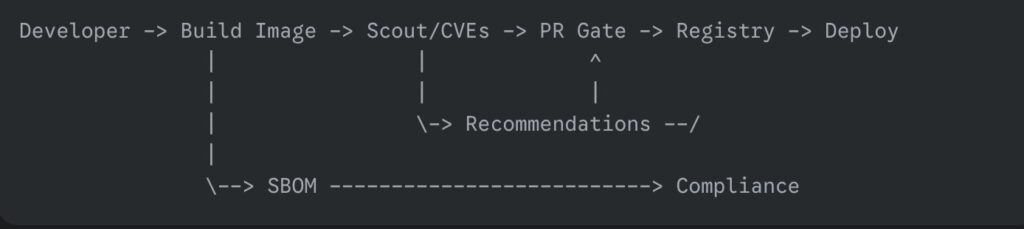
One small diagram to keep in your head

Nothing exotic here. You do not need a new mental model, only a couple of strategic checks where they hurt the least.

A pull request check that is sharp but kind

You want security to act like a seatbelt, not a speed bump. The workflow below uploads findings to GitHub Code Scanning for visibility and uses a comparison gate so PRs only fail when risk goes up.

name: Container Security
on: [pull_request, push]

jobs:
  scout:
    runs-on: ubuntu-latest
    permissions:
      contents: read
      pull-requests: write
      security-events: write   # upload SARIF
    steps:
      - uses: actions/checkout@v4

      - name: Login to Docker Hub
        uses: docker/login-action@v3
        with:
          username: ${{ secrets.DOCKERHUB_USERNAME }}
          password: ${{ secrets.DOCKERHUB_TOKEN }}

      - name: Build image
        run: |
          docker build -t ghcr.io/acme/web:${{ github.sha }} .

      - name: Analyze CVEs and upload SARIF
        uses: docker/scout-action@v1
        with:
          command: cves
          image: ghcr.io/acme/web:${{ github.sha }}
          only-severities: critical,high
          only-fixed: true
          sarif-file: scout.sarif

      - name: Upload SARIF to Code Scanning
        uses: github/codeql-action/upload-sarif@v3
        with:
          sarif_file: scout.sarif

      - name: Compare against latest and fail on regression
        if: github.event_name == 'pull_request'
        uses: docker/scout-action@v1
        with:
          command: compare
          image: ghcr.io/acme/web:${{ github.sha }}
          to-latest: true
          exit-on: vulnerability
          only-severities: critical,high

Why this works:

  • SARIF lands in Code Scanning, so the whole team sees issues inline.
  • The compare step keeps momentum. If the PR makes the risk lower than or equal to, it passes. If it makes things worse at High or Critical, it fails.
  • The gate is opinionated about fixed issues, which are the ones you can actually do something about today.

Triage that scales beyond one heroic afternoon

People love big vulnerability cleanups the way they love moving house. It feels productive for a day, and then you are exhausted, and the boxes creep back in. Try this instead:

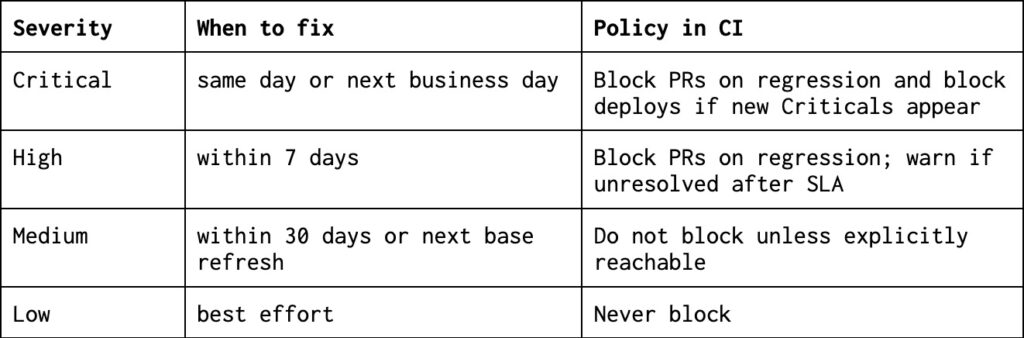
Set a simple SLA

Push on two levers before touching the application code

  1. Refresh the base image suggested by the recommendations. This often clears the noisy majority in minutes.
  2. Switch to a slimmer base if your app allows it. debian:bookworm-slim or a minimal distroless image reduces attack surface, and your scanner reports will look cleaner because there is simply less there.

Use comparisons to stop bikeshedding
Make the conversation about direction rather than absolutes. If each PR is no worse than the baseline, you are winning.

Document exceptions as artifacts
When something is not reachable or is mitigated elsewhere, record it alongside the SBOM or in your tracking system. Invisible exceptions return like unwashed coffee mugs.

Common traps and how to step around them

The base image is doing most of the damage
If your report looks like a fireworks show, run recommendations. If it says “update base” and you ignore it, you are choosing to mop the floor while the tap stays open.

You still run everything as root
Even perfect CVE hygiene will not save you if the container has god powers. If you can, adopt a non‑root user and a slimmer runtime image. A typical multi‑stage pattern looks like this:

# Build stage
FROM golang:1.22 as builder
WORKDIR /src
COPY . .
RUN CGO_ENABLED=0 GOOS=linux go build -o /bin/app ./cmd/api

# Runtime stage
FROM gcr.io/distroless/static:nonroot
COPY --from=builder /bin/app /app
USER nonroot:nonroot
ENTRYPOINT ["/app"]

Now your scanner report shrinks, and your container stops borrowing the keys to the building.

Your scanner finds Mediums you cannot fix today
Save your energy for issues with available fixes or for regressions. Mediums without fixes belong on a to‑do list, not a release gate.

The team treats the scanner as a chore
Keep the feedback quick and visible. Short PR notes, one SBOM per release, and a small monthly base refresh beat quarterly crusades.

Working with registries without drama

Local images work out of the box. For remote registries, enable analysis where you store images and authenticate normally through Docker. If you are using a private registry such as ECR or ACR, link it through the vendor’s integration or your registry settings, then keep using the same CLI commands. The aim is to avoid side channels and keep your workflow boring on purpose.

A lightweight checklist you can adopt this week

  1. Baseline today: run QuickView on your main images and keep the outputs as a reference.
  2. Gate on direction: use compare in PRs with exit-on: vulnerability limited to High and Critical.
  3. Refresh bases monthly: schedule a small chore day where you accept the recommended base image bumps and rebuild.
  4. Keep an SBOM: publish cyclonedx-json or SPDX for every release so audits are not a scavenger hunt.
  5. Write down exceptions: if you decide not to fix something, make the decision discoverable.

Frequently asked questions you will hear in standups

Can we silence CVEs that we do not ship to production
Yes. Focus on fixed Highs and Criticals, and gate only on regressions. Most other issues are housekeeping.

Will this slow our builds?
Not meaningfully when you keep output small and comparisons tight. It is cheaper than a hotfix sprint on Friday.

Do we need another dashboard?
You need visibility where developers live. Upload SARIF to Code Scanning, and you are done. The fewer tabs, the better.

Final nudge

Security that ships beats security that lectures. Start with a baseline, gate on direction, and keep a steady rhythm of base refreshes. In a couple of sprints, you will notice fewer alarms, fewer debates, and release notes that read like a grocery receipt instead of a hostage letter.

If your containers still show up with suspicious items in their pockets, at least now you can point to the pocket, the store it came from, and the cheaper replacement. That tiny bit of provenance is often the difference between a calm Tuesday and a war room with too much pizza.

If you remember nothing else, remember three habits. Run QuickView on your main images once a week. Let compare guard your pull requests. Accept the base refresh that Scout recommends each month. Everything else is seasoning.

Measure success by absence. Fewer “just-one-hotfix” pings at five on Friday. Fewer meetings where severity taxonomies are debated like baby names. More merges that feel like brushing your teeth, brief, boring, done.

Tools will not make you virtuous, but good routines will. Docker Scout shortens the routine and thins the excuses. Baseline today, set the gate, add a tiny chore to the calendar, and then go do something nicer with your afternoon.

Building living systems with WebSockets

For the longest time, communication on the web has been a painfully formal affair. It’s like sending a letter. Your browser meticulously writes a request, sends it off via the postal service (HTTP), and then waits. And waits. Eventually, the server might write back with an answer. If you want to know if anything has changed five seconds later, you have to send another letter. It’s slow, it’s inefficient, and frankly, the postman is starting to give you funny looks.

This constant pestering, “Anything new? How about now? Now?”, is the digital equivalent of a child on a road trip asking, “Are we there yet?” It’s called polling, and it’s the clumsy foundation upon which much of the old web was built. For applications that need to feel alive, this just won’t do.

What if, instead of sending a flurry of letters, we could just open a phone line directly to the server? A dedicated, always-on connection where both sides can just shout information at each other the moment it happens. That, in a nutshell, is the beautiful, chaotic, and nonstop chatter of WebSockets. It’s the technology that finally gave our distributed systems a voice.

The secret handshake that starts the party

So how do you get access to this exclusive, real-time conversation? You can’t just barge in. You have to know the secret handshake.

The process starts innocently enough, with a standard HTTP request. It looks like any other request, but it carries a special, almost magical, header: Upgrade: websocket. This is the client subtly asking the server, “Hey, this letter-writing thing is a drag. Can we switch to a private line?”

If the server is cool, and equipped for a real conversation, it responds with a special status code, 101 Switching Protocols. This isn’t just an acknowledgment; it’s an agreement. The server is saying, “Heck yes. The formal dinner party is over. Welcome to the after-party.” At that moment, the clumsy, transactional nature of HTTP is shed like a heavy coat, and the connection transforms into a sleek, persistent, two-way WebSocket tunnel. The phone line is now open.

So what can we do with all this chatter?

Once you have this open line, the possibilities become far more interesting than just fetching web pages. You can build systems that breathe.

The art of financial eavesdropping

Think of a stock trading platform. With HTTP, you’d be that sweaty-palmed investor hitting refresh every two seconds, hoping to catch a price change. With WebSockets, the server just whispers the new prices in your ear the microsecond they change. It’s the difference between reading yesterday’s newspaper and having a live feed from the trading floor piped directly into your brain.

Keeping everyone on the same page literally

Remember the horror of emailing different versions of a document back and forth? “Report_Final_v2_Johns_Edits_Final_FINAL.docx”. Collaborative tools like Google Docs killed that nightmare, and WebSockets were the murder weapon. When you type, your keystrokes are streamed to everyone else in the document instantly. It’s a seamless, shared consciousness, not a series of disjointed monologues.

Where in the world is my taxi

Ride-sharing apps like Uber would be a farce without a live map. You don’t want a “snapshot” of where your driver was 30 seconds ago; you want to see that little car icon gliding smoothly toward you. WebSockets provide that constant stream of location data, turning a map from a static picture into a living, moving window.

When the conversation gets too loud

Of course, hosting a party where a million people are all talking at once isn’t exactly a walk in the park. This is where our brilliant WebSocket-powered dream can turn into a bit of a logistical headache.

A server that could happily handle thousands of brief HTTP requests might suddenly break into a cold sweat when asked to keep tens of thousands of WebSocket phone lines open simultaneously. Each connection consumes memory and resources. It’s like being a party host who promised to have a deep, meaningful conversation with every single guest, all at the same time. Eventually, you’re just going to collapse from exhaustion.

And what happens if the line goes dead? A phone can be hung up, but a digital connection can just… fade into the void. Is the client still there, listening quietly? Or did their Wi-Fi die mid-sentence? To avoid talking to a ghost, servers have to periodically poke the client with a ping message. If they get a pong back, all is well. If not, the server sadly hangs up, freeing the line for someone who actually wants to talk.

How to be a good conversation host

Taming this beast requires a bit of cleverness. You can’t just throw one server at the problem and hope for the best.

Load balancers become crucial, but they need to be smarter. A simple load balancer that just throws requests at any available server is a disaster for WebSockets. It’s like trying to continue a phone conversation while the operator keeps switching you to a different person who has no idea what you were talking about. You need “sticky sessions,” which is a fancy way of saying the load balancer is smart enough to remember which server you were talking to and keeps you connected to it.

Security also gets a fun new twist. An always-on connection is a wonderfully persistent doorway into your system. If you’re not careful about who you’re talking to and what they’re saying (WSS, the secure version, is non-negotiable), you might find you’ve invited a Trojan horse to your party.

A world that talks back

So, no, WebSockets aren’t just another tool in the shed. They represent a philosophical shift. It’s the moment we stopped treating the web like a library of dusty, static books and started treating it like a bustling, chaotic city square. We traded the polite, predictable, and frankly boring exchange of letters for the glorious, unpredictable mess of a real-time human conversation.

It means our applications can now have a pulse. They can be surprised, they can interrupt, and they can react with the immediacy of a startled cat. Building these living systems is certainly noisier and requires a different kind of host, one who’s part traffic cop and part group therapist. But by embracing the chaos, we create experiences that don’t just respond; they engage, they live. And isn’t building a world that actually talks back infinitely more fun?