
LinuxKernel

The kernel dashboard you already have but ignore

The pager goes off at 3 AM. Your most critical Kubernetes node is gasping for air. You SSH into the box, but your fancy cloud observability agents are completely frozen. You cannot run top, htop is a distant dream, and your metrics dashboard is just a spinning loading wheel of despair.

What do you do now?

Most people panic. But if you know where to look, your Linux server has a secret, real-time dashboard built right in. It requires zero agents, consumes zero disk space, and is literally generating its data on the fly just for you.

Welcome to the weird, wonderful, and slightly chaotic world of the proc pseudo-filesystem.

The hallucinated filesystem

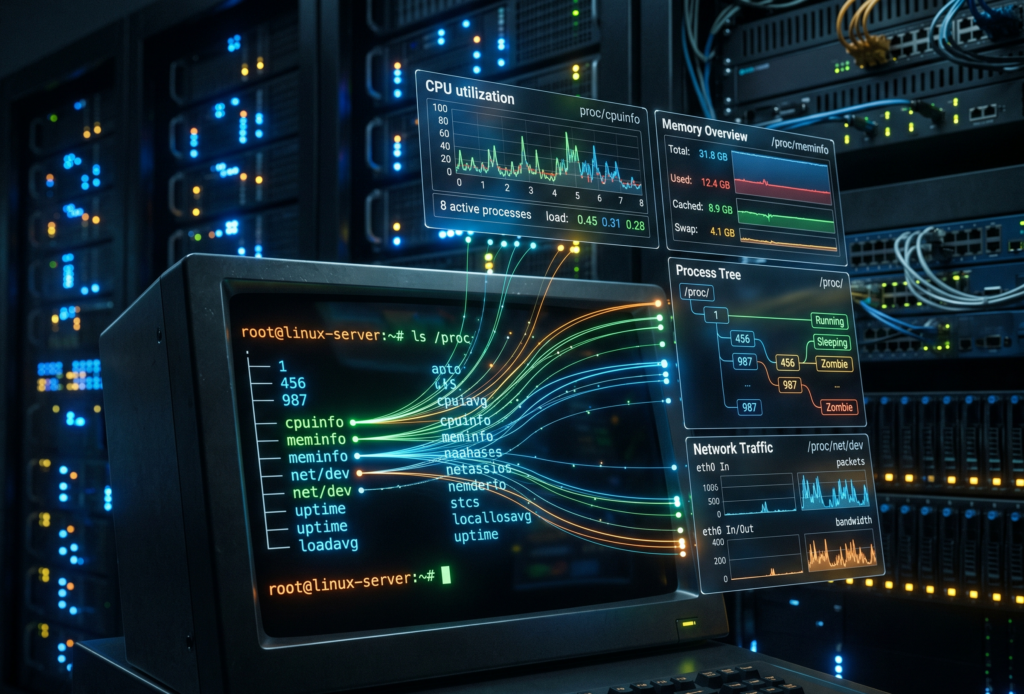
If you run ls /proc, you will see what looks like a messy drawer full of text files and numbered directories. It is easy to dismiss it as legacy kernel clutter. But here is the bizarre truth about this directory. It does not exist.

Not on your SSD, anyway. The proc filesystem is a pure hallucination managed by the kernel. It exists entirely in RAM. The files inside it have a size of zero bytes right up until the exact microsecond you try to read them. When you run cat /proc/uptime, the kernel intercepts your request, hastily scribbles down the current system state, and hands it back to you.

It is the “everything is a file” Unix philosophy taken to its absolute, absurd logical conclusion. And once you understand how to read it, it becomes an indispensable tool for Cloud Architecture and DevOps engineers.

Gold nuggets for your daily rotation

You do not need to memorize every file in here. Treat it like a hardware store. You only need to know where the hammers and screwdrivers are kept.

The memory health check

Checking /proc/meminfo gives you your memory health at a glance, long before you even try to execute free -h. It is the raw, unfiltered truth about your RAM.

The CPU heartbeat

You can check /proc/loadavg and /proc/stat to understand CPU load and scheduler activity. Load average is like looking at the queue outside a nightclub. It tells you how many processes are waiting to get onto the CPU dance floor.

The network socket inventory

When you are trapped inside a stripped-down Docker container that lacks ss or netstat, /proc/net/tcp and /proc/net/udp are your best friends. They list every active socket connection.

The runtime clock

A quick look at /proc/uptime gives you the system runtime and idle time in a single line. It is incredibly easy to parse for quick uptime checks in your automation scripts.

Peeking inside running applications

If the root of this filesystem is the global state of the machine, the numbered directories are the personal diaries of every running application. Each number corresponds to a Process ID.

Finding the exact command

Sometimes, ps truncates output or is not installed. You can read /proc/<pid>/cmdline to see the exact, literal command that launched the process, null bytes and all.

Reading the environment

Checking /proc/<pid>/environ reveals the environment variables the process started with. It is an absolute goldmine for debugging and a terrifying danger zone for security. Environment variables are like a bouncer who will not let the application start unless its name is on the list, and the application brought the list itself.

Chasing file descriptors

If you ever hit a “too many open files” error, look inside /proc/<pid>/fd/. This directory contains symlinks to every single file, socket, and pipe the application is currently holding onto.

Surviving the cloud native illusion

Containers are, fundamentally, just Linux processes lying to themselves about how much of the world they own. They think they are the only tenant in the building. When you are working with Kubernetes, this pseudo-filesystem bridges the gap between the illusion and the reality.

When eBPF tools or your sidecar agents fail, this interface is your manual override. You can check /proc/<pid>/cgroup to see exactly which control groups are clamping down on your process. If a container keeps getting killed by the Out Of Memory killer, you can watch /proc/<pid>/oom_score to see how angry the kernel is getting at that specific process. The higher the number, the more likely the kernel is going to take it out back and end its misery.

War stories from the trenches

Theoretical knowledge is great, but let us look at how this saves your skin when you are sleep deprived.

The phantom disk filler

Your alerts say the disk is at 100%. You find a massive 50GB application log and delete it. You run df -h again. The disk is still at 100%. What happened? The application is still writing to the deleted file. A file is not truly deleted until the last process closes it. Running lsof or digging through /proc/<pid>/fd will show you the deleted file still held open by the stubborn process. Restart the process, and your 50GB magically returns.

The frozen startup

An application hangs immediately on startup. It is not using CPU, and it is not crashing. What is it waiting for? Inspecting /proc/<pid>/wchan will literally tell you the exact kernel function where the process went to sleep.

The dark side of the dashboard

It is not all sunshine and perfectly formatted data. There are traps here.

First, formatting varies between kernel versions. Writing a strict regular expression to parse these files in a production bash script is a recipe for tears. Always use defensive coding.

Second, the /proc/sys/ directory is not just for looking. It is for touching. This is where kernel tunables live, the underlying mechanism for sysctl. Writing the wrong value here can permanently break your network stack or cause a kernel panic faster than you can hit Ctrl+C. Look, but do not touch unless you have read the documentation twice.

Quick reference sheet

Keep this list handy for your next terminal session.

  • cat /proc/cpuinfo shows your hardware details
  • cat /proc/version gives you the exact kernel and distro info
  • ls -l /proc/<pid>/fd displays live file descriptors
  • cat /proc/net/dev reveals network interface stats
  • echo 3 > /proc/sys/vm/drop_caches frees up pagecache, dentries, and inodes (and makes your database administrator incredibly nervous)

Keep a terminal open to your kernel

This interface is the universal API. It is present when your monitoring tools are broken, when your containers are stripped bare, and when the orchestrator is lying to you.

Next time you SSH into a server or run kubectl exec into a pod, take a second to explore this directory before you reflexively type htop. In the cloud, understanding this in-memory filesystem means you understand exactly what your platform sees. And that is the kind of visibility no vendor can sell you.


Observability with eBPF technology

Running today’s software systems can feel a bit like trying to understand a bustling city from a helicopter high above. You see the general traffic flow, but figuring out why a specific street is jammed or where a particular delivery truck is going is tough. We have tools, of course, lots of them. But often, getting the detailed information we need means adding bulky agents or changing our applications, which can slow things down or create new problems. It’s a classic headache for anyone building or running software, whether you’re in DevOps, SRE, development, or architecture.

Wouldn’t it be nice if we had a way to get a closer look, right down at the street level, without actually disturbing the traffic? That’s essentially what eBPF lets us do. It’s a technology that’s been quietly brewing within the Linux kernel, and now it’s stepping into the spotlight, offering a new way to observe what’s happening inside our systems.

What makes eBPF special for watching systems

So, what’s the magic behind eBPF? Think of the Linux kernel as the fundamental operating system layer, the very foundation upon which all your applications run. It manages everything: network traffic, file access, process scheduling, you name it. Traditionally, peering deep inside the kernel was tricky, often requiring complex kernel module programming or using tools that could impact performance.

eBPF changes the game. It stands for Extended Berkeley Packet Filter, but it has grown far beyond just filtering network packets. It’s more like a tiny, super-efficient, and safe virtual machine right inside the kernel. We can write small programs that hook into specific kernel events, like when a network packet arrives, a file is opened, or a system call is made. When that event happens, our little eBPF program runs, gathers information, and sends it out for us to see.

Here’s why this is such a breakthrough for observability:

  • Deep Visibility Without the Weight: Because eBPF runs right in the kernel, it sees things with incredible clarity. It can capture detailed system events, network calls, and even hardware metrics. But crucially, it does this without needing heavy agents installed everywhere or requiring you to modify your application code (instrumentation). This low overhead is perfect for today’s complex distributed systems and microservice architectures where performance is key.
  • Seeing Things as They Happen: eBPF lets us tap into a live stream of data. We can track system calls, network flows, or function executions in real-time. This immediacy is fantastic for spotting anomalies or understanding performance issues the moment they arise, not minutes later when the logs finally catch up.
  • Tailor-made Views: You’re not stuck with generic, one-size-fits-all monitoring. Teams can write specific eBPF programs (often called probes or scripts) to look for exactly what matters to them. Need to understand a specific network interaction? Or figure out why a particular function is slow? You can craft an eBPF program for that. This allows plugging visibility gaps left by other tools and lets you integrate the data easily into systems you already use, like Prometheus or Grafana.

Seeing eBPF in action with practical examples

Alright, theory is nice, but where does the rubber meet the road? How are folks using eBPF to make their lives easier?

  • Untangling Distributed Systems: Microservices are great, but tracking a single user request as it bounces between dozens of services can be a nightmare. eBPF can trace these requests across service boundaries, directly observing the network calls and processing times at the kernel level. This helps pinpoint those elusive latency bottlenecks or failures that traditional tracing might miss.
  • Finding Performance Roadblocks: Is an application slow? Is the server overloaded? eBPF can help identify which processes are hogging CPU or memory, which disk operations are taking too long, or even optimize slow database queries by watching the underlying system interactions. It provides granular data to guide performance tuning efforts.
  • Looking Inside Containers and Kubernetes: Containers add another layer of abstraction. eBPF offers a powerful way to see inside containers and understand their interactions with the host kernel and each other, often without needing to install monitoring agents (sidecars) in every single pod. This simplifies observability in complex Kubernetes environments significantly.
  • Boosting Security: Observability isn’t just about performance; it’s also about security. eBPF can act like a security camera at the kernel level. It can detect unusual system calls, unauthorized network connections, or suspicious file access patterns in real-time, providing an early warning system against potential threats.

Who is using this cool technology?

This isn’t just a theoretical tool; major players are already relying on eBPF.

  • Big Tech and SaaS Companies: Giants like Meta and Google use eBPF extensively to monitor their vast fleets of microservices and optimize performance within their massive data centers. They need efficiency and deep visibility, and eBPF delivers.
  • Financial Institutions: The finance world needs speed, reliability, and security. They’re using eBPF for real-time fraud detection by monitoring system behavior and ensuring compliance by having a clear audit trail of system activities.
  • Online Retailers: Imagine the traffic surge during an event like Black Friday. E-commerce platforms leverage eBPF to keep their systems running smoothly under extreme load, quickly identifying and resolving bottlenecks to ensure customers have a good experience.

Where is eBPF headed next?

The journey for eBPF is far from over. We’re seeing exciting developments:

  • Playing Nicer with Others: Integration with standards like OpenTelemetry is making it easier to adopt eBPF. OpenTelemetry aims to standardize how we collect and export telemetry data (metrics, logs, traces), and eBPF fits perfectly into this picture as a powerful data source. This helps create a more unified observability landscape.
  • Beyond Linux: While born in Linux, the core ideas and benefits of eBPF are inspiring similar approaches in other areas. We’re starting to see explorations into using eBPF concepts for networking hardware, IoT devices, and even helping understand the performance of AI applications.

A new lens on systems

So, eBPF is shaping up to be more than just another tool in the toolbox. It offers a fundamentally different approach to understanding our increasingly complex systems. By providing deep, low-impact, real-time visibility right from the kernel, it empowers DevOps teams, SREs, developers, and architects to build, run, and secure modern applications more effectively. It lets us move from guessing to knowing, turning those opaque system internals into something we can finally observe clearly. It’s definitely a technology worth watching and maybe even trying out yourself.